
 ซอฟต์แวร์
 แอปพลิเคชันบนมือถือ
 เช็คความเร็วเน็ต (Speedtest)
 เช็คไอพี (Check IP)
 เช็คเลขพัสดุ
 สุ่มออนไลน์
 เครื่องมือคำนวณวันออนไลน์
OmniGet (โปรแกรมดาวน์โหลดวิดีโอ และคอร์สเรียน พร้อมถอดเสียงในแอปเดียว)

ข้อมูลทั่วไป ก่อน ดาวน์โหลดโปรแกรม
 Windows
 macOS
macOS Linux / FreeBSD
โปรแกรม OmniGet
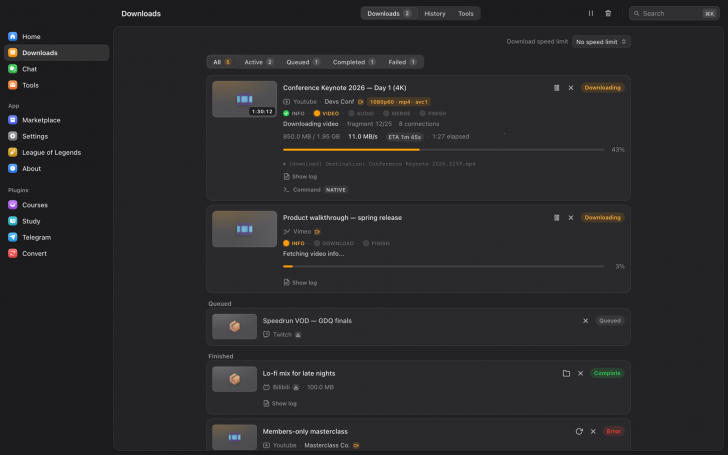
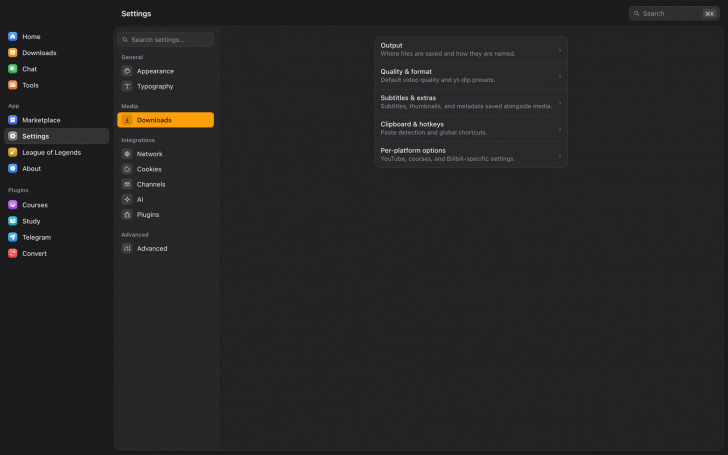
OmniGet (โปรแกรมดาวน์โหลดวิดีโอ และคอร์สเรียน พร้อมถอดเสียงในแอปเดียว) : โปรแกรม OmniGet เป็นโปรแกรมคอมพิวเตอร์ รองรับ ระบบปฏิบัติการ (OS) ยอดนิยมอย่าง วินโดวส์ (Windows), แมคโอเอส (macOS) และ ลีนุกซ์ (Linux) ตัวโปรแกรมถูกออกแบบมาเพื่อเป็นศูนย์รวมในการดาวน์โหลดเนื้อหามัลติมีเดีย และไฟล์จาก อินเทอร์เน็ต (Internet) มากกว่า 1,800 เว็บไซต์ โดยรวมความสามารถของเครื่องมือดาวน์โหลดสายคำสั่งยอดนิยมอย่าง yt-dlp, FFmpeg และ gallery-dl เข้ามาไว้ในหน้าต่างโปรแกรมที่ใช้งานง่ายเพียงแค่คัดลอกลิงก์มาวาง ทำให้ผู้ใช้งานทั่วไปไม่จำเป็นต้องมีความรู้เรื่องการเปิดพิมพ์คำสั่งใน Terminal อีกต่อไป
ความสามารถหลักของโปรแกรม OmniGet ครอบคลุมตั้งแต่การดาวน์โหลดวิดีโอทั่วไป, เพลง, รูปภาพ ไปจนถึงเนื้อหาที่มีความซับซ้อน เช่น คอร์สเรียนออนไลน์จากแพลตฟอร์มต่าง ๆ เช่น Udemy หรือ Hotmart โดยตัวโปรแกรมจะโหลดทั้งบทเรียนตามโครงสร้างส่วน และไฟล์แนบของคอร์สมาให้อย่างครบถ้วน นอกจากนี้ ยังรองรับการดาวน์โหลดวิดีโอบนโซเชียลมีเดียยอดนิยม ไม่ว่าจะเป็น YouTube, Instagram, Tiktok, X, Reddit, Pinterest และ Bilibili รวมถึงรองรับการดาวน์โหลดไฟล์ขนาดใหญ่ผ่านลิงก์ Magnet หรือไฟล์ .torrent ด้วยระบบ BitTorrent ในตัว ตลอดจนการเซฟไฟล์สื่อจากกลุ่ม หรือช่องใน Telegram
จุดเด่นสำคัญของโปรแกรม OmniGet คือ การทำงานร่วมกับ ส่วนขยาย (Extension) บน เว็บเบราว์เซอร์ (Web Browser) ซึ่งทำให้ผู้ใช้สามารถดึงคุกกี้ยืนยันตัวตนจากเบราว์เซอร์ไปใช้ในการดาวน์โหลดเนื้อหาที่เป็นส่วนตัว เนื้อหาสำหรับสมาชิก หรือคอร์สเรียนที่เสียเงินซื้อไว้แล้วได้ทันที และเมื่อดาวน์โหลดไฟล์เสร็จเรียบร้อยแล้ว โปรแกรมไม่ได้ทำหน้าที่เพียงแค่บันทึกไฟล์ไว้ลงเครื่องเท่านั้น แต่ยังมีเครื่องมือ และระบบรองรับการเปิดใช้งานภายในตัว เช่น เครื่องมือเล่นวิดีโอคอร์สเรียนพร้อมบันทึกโน้ต โปรแกรมอ่าน ไฟล์ PDF และ ไฟล์ ePUB, ระบบถอดความเสียงเป็นข้อความ, เครื่องมือแปลงไฟล์ รวมถึงฟังก์ชันสำหรับอ่าน และสร้างแฟลชการ์ดเพื่อการศึกษา
ในด้านความเป็นส่วนตัว และสถาปัตยกรรมซอฟต์แวร์ ตัวโปรแกรม OmniGet พัฒนาขึ้นโดยเน้นให้ไฟล์ และข้อมูลทั้งหมดถูกจัดเก็บ และประมวลผลอยู่บนเครื่องของผู้ใช้เอง โดยไม่มีการเก็บข้อมูลพฤติกรรมการใช้งาน หรือการดาวน์โหลดไปยัง เซิร์ฟเวอร์ (Server) ภายนอก, เป็น โปรแกรมแบบพกพา (Portable Application) ที่สามารถใส่ไว้ใน แฟลชไดร์ฟ (Flash Drive) เพื่อนำไปใช้งานบนเครื่องอื่นได้ทันที และยังมีระบบทำงานอัตโนมัติต่าง ๆ เช่น การคัดลอกลิงก์แล้วกดคีย์ลัดเพื่อดาวน์โหลดทันทีในเบื้องหลัง ตลอดจนการตั้งค่าตรวจเช็กช่องวิดีโอที่ติดตามไว้เพื่อดาวน์โหลดคลิปใหม่มาลงเครื่องให้อัตโนมัติ
คุณสมบัติ และความสามารถของ โปรแกรม OmniGet
การรองรับแหล่งดาวน์โหลด
- รองรับเว็บมากกว่า 1,800+ แห่ง ขับเคลื่อนด้วยเอนจิน yt-dlp ในตัว รองรับเว็บวิดีโอ และโซเชียลมีเดียชั้นนำ
- ดาวน์โหลดคอร์สเรียนได้ทั้งโครงสร้างบทเรียน ไฟล์แนบ และสถานะการเรียนผ่านปลั๊กอิน Courses (รองรับแพลตฟอร์ม เช่น Udemy, Hotmart, Kiwify ฯลฯ)
- มี BitTorrent Client ในตัว รองรับไฟล์ .torrent และลิงก์ Magnet รวมถึงไฟล์ HTTP Direct, HLS และ DASH
- ดึงรูปภาพยกอัลบั้ม/โปรไฟล์ได้มากกว่า 250+ เว็บไซต์ เช่น DeviantArt, Pixiv, ArtStation, Flickr ผ่านเอนจิน gallery-dl
- ดาวน์โหลดรูปภาพ วิดีโอ Audio และไฟล์ต่าง ๆ จากกลุ่มหรือช่อง Telegram ที่เป็นสมาชิกผ่าน Telegram Plugin
ฟังก์ชั่นการดาวน์โหลด และประสิทธิภาพ
- ติดตั้ง และอัปเดต yt-dlp และ FFmpeg ให้อัตโนมัติ พร้อมใช้งานทันที
- เลือกคุณภาพวิดีโอ/เสียงได้ เช่น ไฟล์ MP3, M4A, Opus, FLAC, WAV
- รองรับการฝังคำซับไตเติล SRT, VTT, ASS, ฝังปก (Thumbnail) และ เมทาดาตา (Metadata) อัตโนมัติ
- รองรับการดาวน์โหลดต่อ (Resume), มีระบบ Retry อัตโนมัติเมื่อเจอปัญหาสัญญาณ หรือ Rate limit และปรับขนาดการเชื่อมต่อแบบขนาน (Parallel connection) ตามความเหมาะสมของแต่ละเว็บ
- สามารถคัดลอกลิงก์แล้วกดคีย์ลัด เช่น "ปุ่ม Ctrl + Shift + D" สำหรับดาวน์โหลด หรือ "ปุ่ม Ctrl + Shift + M" สำหรับเอาเฉพาะเสียง เพื่อดาวน์โหลดในเบื้องหลังได้ทันที
- วางลิงก์ทีละหลาย ๆ ลิงก์ หรือโหลดจากไฟล์ .txt ได้เพื่อดาวน์โหลดพร้อมกันจำนวนมาก
เครื่องมือ และการจัดการหลังดาวน์โหลด
- แบ่งเป็นหมวดหมู่ย่อยสำหรับจัดการไฟล์ เช่น ถอดรหัสเสียงเป็นข้อความ Transcribe, แปลงไฟล์ Convert ฯลฯ
- มีเครื่องมือเล่นวิดีโอ/คอร์สเรียน, โปรแกรมอ่านไฟล์ PDF/EPUB, ระบบบันทึก โน้ต และการสร้าง Flashcards เพื่อการทบทวน
- มีส่วนขยายสำหรับเว็บเบราว์เซอร์ ช่วยส่งผ่าน Cookies / Login Session เพื่อดาวน์โหลดเนื้อหาที่ต้องเข้าสู่ระบบได้อย่างสะดวก
ความเป็นส่วนตัว และรูปแบบโปรแกรม
- ไฟล์ทั้งหมดจะถูกบันทึกไว้ในเครื่องของผู้ใช้เท่านั้น ไม่ต้องลงทะเบียนบัญชี, ไม่มีระบบโฆษณา และไม่มีการเก็บข้อมูลพฤติกรรมการดาวน์โหลด
- มีเวอร์ชันสำหรับ Windows, macOS และ Linux
- รองรับการรันผ่านแฟลชไดรฟ์โดยไม่ทิ้งไฟล์การตั้งค่าไว้ใน AppData ของระบบ
และความสามารถอื่น ๆ อีกมากมาย
เงื่อนไขการใช้งาน โปรแกรม OmniGet
โปรแกรม OmniGet เป็นซอฟต์แวร์ ฟรี (Free) ที่พัฒนาแบบ โอเพ่นซอร์ส (Open-Source) ที่อยู่ภายใต้เงื่อนไขการใช้งานแบบ GPL-3.0 License ซึ่งหมายความว่าผู้ใช้สามารถใช้งาน, ดัดแปลง, แจกจ่าย และเข้าถึง โค้ดต้นฉบับ (Source Code) ได้อย่างเสรี ภายใต้เงื่อนไขที่กำหนด
หากต้องการค้นหาข้อมูลเพิ่มเติม สามารถติดต่อกับทางผู้พัฒนาโปรแกรมนี้ได้ผ่านทางช่องทางเว็บไซต์ (Website) : https://github.com/tonhowtf/omniget (ภาษาอังกฤษ) ได้เลย
คำบรรยายภาษาอังกฤษ (English Descriptions)
OmniGet is a desktop application supporting Windows, macOS, and Linux. Designed as an all-in-one hub for downloading multimedia content and files from over 1,800 websites, it integrates popular command-line download tools like yt-dlp, FFmpeg, and gallery-dl into a user-friendly interface where users simply copy and paste a link. This eliminates the need for general users to have any technical knowledge of running commands in a terminal.
The core capabilities of OmniGet range from downloading standard videos, music, and images to more complex content such as online courses from platforms like Udemy or Hotmart. The program retrieves full lessons, section structures, and course attachments seamlessly. Furthermore, it supports downloading videos from popular social media platforms including YouTube, Instagram, TikTok, X, Reddit, Pinterest, and Bilibili, while also handling large file downloads through magnet links or .torrent files via a built-in BitTorrent client, as well as media files from Telegram channels and groups.
A key highlight of OmniGet is its integration with a web browser extension, allowing users to pass authentication cookies from their browser to download private, member-only, or purchased course content instantly. Once downloads are complete, the software goes beyond merely saving files to your machine by providing built-in playback and study tools. These include a course video player with note-taking support, a PDF and EPUB reader, an audio-to-text transcription engine, a file converter, and flashcard tools for learning.
In terms of privacy and software architecture, OmniGet is built to ensure all files and data remain stored and processed locally on the user's computer without sending usage logs or download history to external servers. It functions as a portable application that can be run directly from a USB flash drive on any computer, and it includes various automation features such as background downloads triggered by hotkeys after copying a link, as well as automated monitoring of followed channels to download new video releases onto your drive automatically.
 คำสำคัญ

โปรแกรมที่เกี่ยวข้อง !







ความคิดเห็น ()


ซอฟต์แวร์ไทย
Thai Software
ซอฟต์แวร์ฟรี
Freeware
ซอฟต์แวร์สามัญ
First AID
ซอฟต์แวร์แนะนำ
Recommended
สูงสุดในสัปดาห์
Top Download
สูงสุดตลอดกาล
Hall of Fame
Submit Software
บริการเช็คความเร็วเน็ต (Speedtest) และ เช็คไอพี (Check IP)
 เช็คความเร็วเน็ต
 เช็คไอพี


Thaiware.com is owned and operated by Thaiware Communication Co., Ltd.