
 ซอฟต์แวร์
 แอปพลิเคชันบนมือถือ
 เช็คความเร็วเน็ต (Speedtest)
 เช็คไอพี (Check IP)
 เช็คเลขพัสดุ
 สุ่มออนไลน์
 เครื่องมือคำนวณวันออนไลน์
LightCraft (โปรแกรมแต่งรูป RAW ฟรี จัดการรูป สไตล์ Lightroom)
ข้อมูลทั่วไป ก่อน ดาวน์โหลดโปรแกรม
 Windows
 macOS
macOS Linux / FreeBSD
โปรแกรม LightCraft
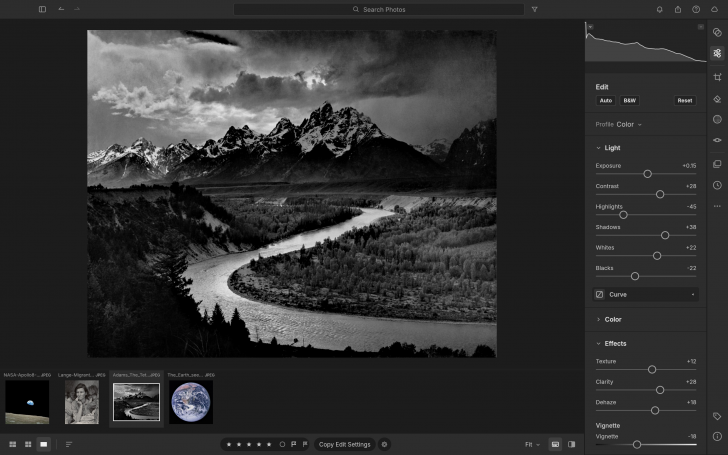
LightCraft (โปรแกรมแต่งรูป RAW ฟรี จัดการรูป สไตล์ Lightroom) : โปรแกรม LightCraft เป็นโปรแกรมแต่งภาพ และจัดการคลังภาพดิจิทัล แบบ Non-destructive ซึ่งเป็นการปรับแต่งแบบไม่ทำลาย หรือแก้ไขไฟล์ต้นฉบับเดิม ซึ่งถูกสร้างขึ้นมาใหม่ทั้งหมดตั้งแต่เริ่มต้นด้วย ภาษา Rust โดยมีจุดประสงค์หลักเพื่อเป็นทางเลือกที่ทำงานได้รวดเร็ว และปลอดภัยสำหรับทดแทนโปรแกรมชื่อดังอย่าง โปรแกรม Adobe Lightroom
โครงสร้างการประมวลผลภาพของโปรแกรม LightCraft ใช้ระบบประมวลผลสีแบบ 32-bit Floating Point, ขอบเขตสีกว้าง (Wide-Gamut) ในระดับ Scene-referred ช่วยให้การแต่งแสง และการปรับโทนมีความนุ่มนวล สมจริง ไม่เกิดรอยหยัก (Halos) หรืออาการสีเพี้ยนเมื่อดึงรายละเอียดในส่วนไฮไลต์ หรือเงามืด, มีเครื่องมือปรับแต่งที่ครบถ้วนสำหรับการทำงานของช่างภาพมืออาชีพ ทั้งชุดปรับแสงแบบ Edge-Aware Local Tone Mapping, การปรับแต่งสีด้วยระบบ OkLCh (Color Mixer 8 แบนด์ และวงล้อ Color Grading แบบ 3 ทาง), เครื่องมือแต่งรายละเอียดอย่าง Texture, Clarity, Dehaze, การปรับแต่งเส้น Tone Curve แบบป้องกันการกลับค่าโทนโดยผิดพลาด, เครื่องมือไดนามิกมาสก์ (Masking) ที่รองรับทั้ง Brush, Gradient และการเลือกพื้นที่ตามสี / ความสว่าง / ท้องฟ้า / วัตถุ รวมถึงการครอบตัด (Crop) และปรับมิติสัดส่วนภาพ
นอกจากส่วนการแต่งภาพแล้ว โปรแกรม LightCraft ยังมีระบบจัดการคลังภาพ (Library) ในตัวที่รองรับการจัดหมวดหมู่ภาพ, การติดดาวให้คะแนน (Rating), การติดธง (Flags), การใส่ป้ายสี (Color labels) และการจัดทำอัลบั้ม การค้นหาภาพในคลังสามารถกรองข้อมูลเชิงลึกผ่าน เมทาดาตา (Metadata) เช่น ค่า ISO, กล้องที่ใช้, วันที่ หรือคำค้นหาเฉพาะ โดยตัวแสดงผล Grid ถูกออกแบบด้วยเทคนิค Virtualization ทำให้สามารถเปิดดูคลังภาพที่มีภาพจำนวนหลายหมื่นรูปได้อย่างลื่นไหล
จุดเด่นที่สำคัญอีกประการของ โปรแกรม LightCraft คือ การเป็นโปรแกรมที่รองรับระบบอัตโนมัติ และการทำงานร่วมกับ ปัญญาประดิษฐ์ (AI) AI Agent อย่างเต็มรูปแบบ ผ่าน โปรโตคอล (Protocol) อย่างตัว Model Context Protocol (MCP) รวมทั้งการควบคุมด้วยคำสั่ง JSON ผ่านระบบ Control Channel, ส่วนติดต่อผู้ใช้แบบบรรทัดคำสั่ง (CLI) หรือ คีย์บอร์ด (Keyboard) ซึ่งปุ่ม, การลากสไลเดอร์ หรือคำสั่งการแต่งภาพทั้งหมดใน ส่วนติดต่อผู้ใช้งานแบบกราฟิก (GUI) จะมี ID ประจำคำสั่ง ทำให้ AI Agent สามารถส่งคำสั่งเข้ามาช่วยคัดเลือกรูป ปรับแต่งแสง มาร์กจุด หรือส่งออกไฟล์ภาพได้อย่างแม่นยำ
ตัวโปรแกรม LightCraft สามารถทำงานได้แบบ Native บน ระบบปฏิบัติการ (OS) แมคโอเอส (macOS), วินโดวส์ (Windows) และ ลีนุกซ์ (Linux) รวมถึงสามารถคอมไพล์ไปทำงานบน เว็บเบราว์เซอร์ (Web Browser) ผ่าน WebAssembly (WASM) ได้อีกด้วย
คุณสมบัติ และความสามารถของ โปรแกรม LightCraft
ภาพรวม และสถาปัตยกรรม
- เขียนขึ้นใหม่ทั้งหมดด้วยภาษา Rust เพื่อประสิทธิภาพ, ความเสถียร และความปลอดภัยของหน่วยความจำ
- ระบบ Non-destructive ทุกการปรับแต่งไม่มีการแก้ไขหรือทำลายไฟล์ภาพต้นฉบับ
- ประมวลผลภาพบนขอบเขตสีแบบกว้าง (Wide-gamut) ระดับ 32-bit Floating Point และใช้โครงสร้าง Scene-Referred ช่วยจัดการไฮไลต์ และเงามืดได้อย่างเป็นธรรมชาติ
- ไม่มีระบบบัญชีผู้ใช้, ไม่มีการเก็บข้อมูลการใช้งาน (No telemetry), ไม่มี คลาวด์ (Cloud) และไม่มีค่าสมัครสมาชิก
- รองรับหลายแพลตฟอร์ม ทำงานแบบ Native บน macOS, Windows, Linux รวมถึงใช้งานบนเว็บเบราว์เซอร์ผ่าน WebAssembly (WASM)
ความเร็ว และการประมวลผล
- GPU Develop Pipeline ประมวลผลภาพความละเอียดสูงได้อย่างรวดเร็ว โดยใช้เวลาตอบสนองเพียงประมาณ 4 มิลลิวินาทีต่อการขยับสไลเดอร์
- มีตัวถอดรหัสไฟล์ RAW ในตัวที่เขียนด้วย Rust รองรับนามสกุลไฟล์ DNG, CR2, ARW, NEF, RAF, RW2, PEF และ ORF
เครื่องมือปรับแต่งภาพ
- ปรับ Exposure, Contrast, Highlights, Shadows, Whites, Blacks พร้อมเทคโนโลยี Local Tone Mapping แบบ Edge-aware ที่ป้องกันเกิดรอยหยัก (Halos)
- ปรับแต่งเส้นโค้งโทนภาพทั้งแบบ Parametric splits และ Point curves (RGB, Red, Green, Blue) ที่ควบคุมความชันไม่ให้เกิดการกลับค่าโทนโดยผิดพลาด
- การจัดการสี
- ปรับ White Balance ค่า Kelvin สำหรับ RAW และค่า Relative สำหรับ JPEG
- ปรับ Vibrance รักษาโทนสีผิว
- Saturation และ Color Mixer แบบ 8 แบนด์ (Hue/Saturation/Luminance) บนพื้นที่สี OkLCh
- วงล้อ Color Grading ปรับแยกส่วน Shadows, Midtones และ Highlights แบบ 3 ทาง ช่วยคุมโทนภาพสไตล์ภาพยนตร์
- เอฟเฟกต์ และการเก็บรายละเอียด
- เครื่องมือ Texture
- Clarity
- Dehaze ลด/เพิ่มหมอกควัน
- Vignette ปรับรัศมี และความฟุ้ง
- Film Grain ที่ปรับขนาด และความขรุขระได้
- มาพร้อมพรีเซ็ตสำเร็จรูป 18 แบบ เช่น Golden Hour, Teal & Orange, Faded Matte รองรับการปรับระดับ Amount (0-200%) และสร้างพรีเซ็ตใช้เองได้
- การปรับสัดส่วนภาพ รองรับ Crop อัตราส่วนต่า ๆ พร้อมระบบ Straighten ดึงระนาบอัตโนมัติไม่ให้หลุดขอบภาพ รวมถึงปรับหมุน กลับด้าน และแก้ Geometry มิติภาพ
ระบบมาสก์ และการปรับเฉพาะจุด
- รองรับแปลง (Brush) ที่สามารถปรับสิ่งต่าง ๆ ได้มากมาย ไม่ว่าจะเป็น
- Size : ขนาด (ขนาดหัวแปรง)
- Feather : ความฟุ้ง (ความนุ่มของขอบหัวแปรง)
- Flow : อัตราการไหล (ความต่อเนื่องของเนื้อสีขณะลาก)
- Density : ความหนาแน่น (ความเข้มพิกเซลของเส้นแปรง)
- Linear Gradient : การไล่เฉดสีแบบเส้นตรง
- Radial Gradient : การไล่เฉดสีแบบรัศมี (แบบวงกลม / กระจายออกจากศูนย์กลาง)
- เลือกพื้นที่ตามช่วงความสว่าง (Luminance Range) และช่วงสี (Color Range)
- รองรับการเลือกท้องฟ้า (Sky), วัตถุหลัก (Subject) และฉากหลัง (Background)
- สามารถนำเงื่อนไขมา Add, Subtract, Intersect หรือ Invert และปรับแต่งพารามิเตอร์เฉพาะจุดได้ถึง 15 ค่าต่อมาสก์
ระบบจัดการคลังภาพ
- จัดเก็บผ่าน Albums, Folders, Picks, Date และ Recently Deleted
- ใส่ดาวคะแนน (0-5 Stars), ติดธง Pick/Reject (P/X/U) และติดป้ายสี (Color Labels 6-9)
- ค้นหาภาพผ่านการระบุเงื่อนไข เมทาดาตา (Metadata) เช่น rating:>3, iso:>800, camera:x2, date:2026-04 หรือคีย์เวิร์ด
- แสดงผลตารางภาพแบบราบรื่น ไม่กระตุก แม้จะมีภาพในคลังจำนวนหลายหมื่นรูป
การรองรับ AI Agent และระบบอัตโนมัติ
- มี Model Context Protocol (MCP) ในตัวสำหรับเชื่อมต่อกับ AI Agent
- ควบคุมผ่านคำสั่ง JSON ได้ทุกเมนู, สไลเดอร์, หัวแปรง และ คีย์บอร์ด (Keyboard) ช็อตคัต มี Command ID ที่แน่นอน สามารถส่งคำสั่งควบคุมผ่าน JSON-Lines Control Channel หรือ ส่วนติดต่อผู้ใช้แบบบรรทัดคำสั่ง (CLI) ได้ 100%
และความสามารถอื่น ๆ อีกมากมาย
เงื่อนไขการใช้งาน โปรแกรม LightCraft
โปรแกรม LightCraft เป็นซอฟต์แวร์ ฟรี (Free) ที่พัฒนาแบบ โอเพ่นซอร์ส (Open-Source) ที่อยู่ภายใต้เงื่อนไขการใช้งานแบบ Apache-2.0, MIT Licenses ซึ่งหมายความว่าผู้ใช้สามารถใช้งาน, ดัดแปลง, แจกจ่าย และเข้าถึง โค้ดต้นฉบับ (Source Code) ได้อย่างเสรี ภายใต้เงื่อนไขที่กำหนด
หากต้องการค้นหาข้อมูลเพิ่มเติม สามารถติดต่อกับทางผู้พัฒนาโปรแกรมนี้ได้ผ่านทางช่องทางเว็บไซต์ (Website) : https://getartcraft.com/apps/lightcraft (ภาษาอังกฤษ) ได้เลย
คำบรรยายภาษาอังกฤษ (English Descriptions)
LightCraft is a non-destructive photo editing and digital asset management software designed to process images without modifying the original files. Written entirely from scratch in pure Rust, its main objective is to serve as a fast and safe open-source alternative to industry-standard applications like Adobe Lightroom.
The core image processing engine utilizes a 32-bit floating-point, wide-gamut pipeline operating in a scene-referred color space. This ensures smooth, realistic lighting and tonal adjustments that prevent halos or color artifacts when recovering highlights and shadows. It features a complete toolset for professional photographers, including edge-aware local tone mapping, perceptual color editing driven by the OkLCh color space (featuring an 8-band color mixer and 3-way color grading wheels), texture and clarity enhancements, dehazing capabilities, monotone curves that prevent tone inversion, versatile dynamic masking (supporting brush, linear/radial gradients, and range or AI-driven selection by color, luminance, sky, or subject), as well as crop and geometric transformations.
Beyond image editing, LightCraft includes a built-in library management system that supports photo organization, star ratings, flag status, color labels, and custom albums. Deep catalog filtering allows users to search by specific metadata parameters such as ISO, camera model, capture date, or custom keywords. The photo grid layout uses virtualized rendering, enabling smooth navigation even across catalogs containing tens of thousands of images.
Another key highlight is its built-in automation and full AI agent compatibility, driven by the Model Context Protocol (MCP). The software can be controlled via JSON commands through a dedicated control channel, command-line interface (CLI), or keyboard inputs. Every button, slider interaction, and edit command in the graphical user interface (GUI) maps to a unique command ID, allowing AI agents to cull, adjust exposure, create masks, or export photos with precise accuracy.
LightCraft runs natively on macOS, Windows, and Linux, and can also be compiled to run directly in web browsers using WebAssembly (WASM).
 คำสำคัญ

โปรแกรมที่เกี่ยวข้อง !








ความคิดเห็น ()


ซอฟต์แวร์ไทย
Thai Software
ซอฟต์แวร์ฟรี
Freeware
ซอฟต์แวร์สามัญ
First AID
ซอฟต์แวร์แนะนำ
Recommended
สูงสุดในสัปดาห์
Top Download
สูงสุดตลอดกาล
Hall of Fame
Submit Software
บริการเช็คความเร็วเน็ต (Speedtest) และ เช็คไอพี (Check IP)
 เช็คความเร็วเน็ต
 เช็คไอพี


Thaiware.com is owned and operated by Thaiware Communication Co., Ltd.