
 ซอฟต์แวร์
 แอปพลิเคชันบนมือถือ
 เช็คความเร็วเน็ต (Speedtest)
 เช็คไอพี (Check IP)
 เช็คเลขพัสดุ
 สุ่มออนไลน์
 เครื่องมือคำนวณวันออนไลน์
PUSH Video Wallpaper (โปรแกรมตั้งวิดีโอเป็นภาพพื้นหลัง หรือ พักหน้าจอ)

ข้อมูลทั่วไป ก่อน ดาวน์โหลดโปรแกรม
 Windows
โปรแกรม PUSH Video Wallpaper
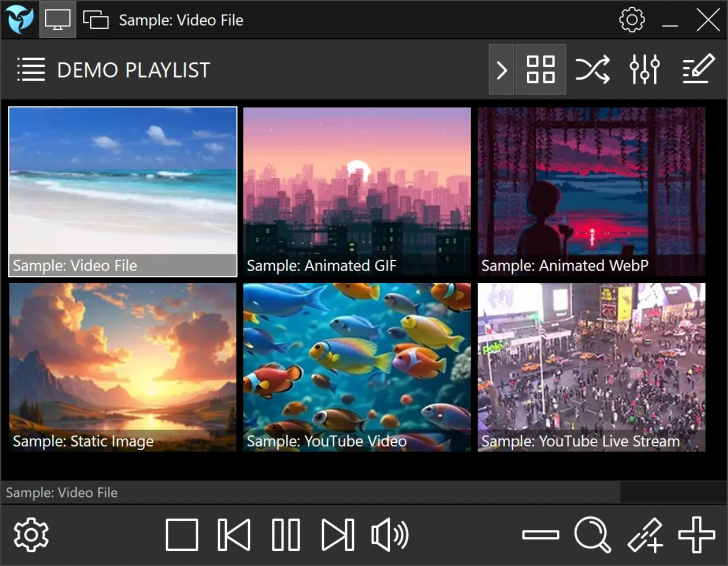
PUSH Video Wallpaper (โปรแกรมตั้งวิดีโอเป็นภาพพื้นหลัง หรือ พักหน้าจอ) : โปรแกรม PUSH Video Wallpaper เป็นโปรแกรมจัดการภาพหน้าจอแบบเคลื่อนไหว (Live Wallpaper Manager) สำหรับ ระบบปฏิบัติการ (OS) อย่าง วินโดวส์ (Windows) ที่ช่วยเปลี่ยนหน้าจอเดสก์ท็อปธรรมดาให้กลายเป็นภาพเคลื่อนไหวที่มีชีวิตชีวา นอกจากจะใช้งานเป็นวอลเปเปอร์บนหน้าจอหลักแล้ว ยังสามารถตั้งค่าให้ทำงานเป็นพักหน้าจอ (Screensaver) บนหน้าจอ Lock Screen ได้อีกด้วย
จุดเด่นของโปรแกรม PUSH Video Wallpaper คือความยืดหยุ่นในการเล่นไฟล์สื่อประเภทต่าง ๆ โดยสามารถดึงไฟล์วิดีโอยอดนิยมอย่าง ไฟล์ MP4, ไฟล์ภาพเคลื่อนไหว GIF, ไฟล์ภาพยุคใหม่อย่าง ไฟล์ WebP รวมถึงการนำลิงก์คลิปวิดีโอ หรือวิดีโอสตรีมมิ่งสดจาก YouTube มาเล่นเป็นวอลเปเปอร์ได้โดยตรง รวมถึงรองรับการสไลด์โชว์ไฟล์ภาพนิ่งผสมกับวิดีโอได้อย่างลื่นไหล
โปรแกรม PUSH Video Wallpaper ถูกออกแบบมาให้ทำงานผ่านระบบเพลย์ลิสต์ เพื่อให้ผู้ใช้จัดหมวดหมู่สื่อได้หลากหลายรูปแบบ ไม่ว่าจะเป็นการสร้างเพลย์ลิสต์พื้นฐาน, การดึงไฟล์จากโฟลเดอร์โดยตรง (Folder Playlist), การอ่านไฟล์สื่อที่บีบอัดอยู่ใน ไฟล์ ZIP โดยไม่ต้องแตกไฟล์ ออกไปจนถึงการรองรับโครงสร้างโฟลเดอร์ขนาดใหญ่ (Folder Tree Playlist)
นอกจากนี้แล้ว ด้วยความสามารถของโปรแกรมนี้ ก็ยังเปิดโอกาสให้ตั้งค่าการแสดงผลแยกตามรายรายการได้ เช่น ปรับความเร็วการเล่น, ตั้งเวลาเล่น, กำหนดการวนซ้ำ หรือตั้งค่าขนาดภาพให้พอดีกับหน้าจอ
สำหรับผู้ใช้ที่เชื่อมต่อต่อหลายจอภาพ โปรแกรม PUSH Video Wallpaper มีระบบ Multi-Monitor ที่สมบูรณ์แบบ ซึ่งเปิดให้แยกการเล่นเพลย์ลิสต์ในแต่ละจออย่างเป็นอิสระ หรือจะสั่งให้ขยายภาพวิดีโอเดียวครอบคลุมทุกจอภาพก็สามารถทำได้เช่นกัน ในด้านประสิทธิภาพ โปรแกรมมีระบบตรวจจับการทำงานของเครื่องเพื่อประหยัดพลังงาน โดยจะหยุดการเล่นวิดีโอชั่วคราวอัตโนมัติเมื่อผู้ใช้เปิดเกมแบบเต็มหน้าจอ (Full Screen) หรือเมื่อใช้งาน โน้ตบุ๊ก (Notebook) ผ่านแบตเตอรี่ ทำให้ไม่กินทรัพยากรเครื่อง และไม่ส่งผลกระทบต่อการทำงานหรือเล่นเกม
ตัวโปรแกรม PUSH Video Wallpaper รองรับการทำงานบน Windows 10 และ Windows 11 โดยต้องการ หน่วยความจำหลัก (RAM) ขั้นต่ำ 2GB และแนะนำให้ใช้งานร่วมกับกับ การ์ดจอออนบอร์ด (Integrated Graphic) หรือ การ์ดจอแยก (Dedicated Graphics Card) เพื่อการแสดงผลที่ราบรื่น การเริ่มต้นใช้งานเพียงแค่นำไฟล์สื่อ หรือลิงก์ YouTube ที่ต้องการใส่ลงในโปรแกรม และกำหนดให้โปรแกรมเริ่มทำงานพร้อมกับการเปิดเครื่อง Windows ได้ทันที
คุณสมบัติ และความสามารถของ โปรแกรม PUSH Video Wallpaper
รองรับสื่อเคลื่อนไหว และไฟล์หลากหลายประเภท
- รองรับไฟล์วิดีโอยอดนิยมทุกรูปแบบ เช่นไฟล์ MP4 เป็นต้น
- รองรับภาพเคลื่อนไหวแบบ GIF และไฟล์ฟอร์แมตใหม่อย่าง WebP
- สามารถดึงคลิปวิดีโอ สตรีมสด หรือรายการเล่น (Playlist) จาก YouTube มาตั้งเป็นวอลเปเปอร์ได้โดยตรงผ่าน ที่อยู่ URL
- สามารถทำสไลด์โชว์ผสมระหว่างวิดีโอ, ภาพนิ่ง และภาพเคลื่อนไหวพร้อมเอฟเฟกต์เปลี่ยนภาพที่ลื่นไหล
ใช้งานเป็นวอลเปเปอร์ และภาพพักหน้าจอ (Screensaver)
- ตั้งค่าเป็นภาพพื้นหลังเคลื่อนไหวบนหน้าจอเดสก์ท็อปหลัก (Live Wallpaper)
- ใช้เป็นภาพพักหน้าจอเมื่อไม่ได้ใช้งานเครื่อง หรือแสดงผลบนหน้าจอล็อก (Lock Screen Screensaver)
- สามารถใช้ คีย์บอร์ด (Keyboard) ควบคุมสื่อในโหมด Screensaver ได้โดยตรง เช่น ปุ่มลูกศร ซ้าย/ขวา เพื่อเปลี่ยนวิดีโอ หรือ ขึ้น/ลง เพื่อปรับระดับเสียง
ระบบจัดการรายการเล่นขั้นสูง
- Standard Playlist : เพิ่มไฟล์วิดีโอ, รูปภาพ หรือลิงก์ YouTube ได้อย่างอิสระ
- Folder Playlist : ดึงไฟล์สื่อจากโฟลเดอร์ที่กำหนดมาเล่นอัตโนมัติเมื่อมีการเพิ่มไฟล์ใหม่
- ZIP Archive Playlist : เล่นไฟล์สื่อที่อยู่ในไฟล์บีบอัด ZIP ได้ทันทีโดยไม่ต้องแตกไฟล์ก่อน
- Folder Tree Playlist : จัดการคลังสื่อขนาดใหญ่ที่มีโฟลเดอร์ซ้อนกันหลายชั้น พร้อมระบบกรองไฟล์ (Filter)
- Custom Overrides : ตั้งค่าแยกรายไฟล์ได้ เช่น การปรับความเร็ววิดีโอ, การหมุน/กลับด้านภาพ การตั้งระยะเวลาแสดงผล และรูปแบบการวนซ้ำ
รองรับระบบหลายหน้าจอ
- รองรับการแสดงผลบนคอมพิวเตอร์ที่ต่อหลายจอภาพอย่างสมบูรณ์
- เลือกเล่นวิดีโอแยกต่างกันในแต่ละจอภาพ หรือปรับแสดงผลเหมือนกันทุกจอ (Duplicate/Extend)
- รองรับการขยายวิดีโอเดียวให้ครอบคลุมแนวยาวตลอดทุกจอภาพ
- เปิด-ปิดการทำงาน หรือตั้งค่าทิศทางภาพแยกเป็นอิสระในแต่ละจอได้
ระบบประหยัดทรัพยากร และการจัดการพลังงาน
- ระบบ Smart Pause หยุดการเล่นวิดีโออัตโนมัติทันที เมื่อเปิดใช้งานเกม หรือโปรแกรมแบบเต็มหน้าจอ (Fullscreen) เพื่อคืนทรัพยากร กราฟิกการ์ด (GPU) และ หน่วยประมวลผลกลาง (CPU)
- ลดระดับการทำงาน หรือหยุดการเรนเดอร์ภาพอัตโนมัติเมื่อแล็ปท็อปเปลี่ยนไปใช้พลังงานจากแบตเตอรี่
การปรับแต่งด้านความสวยงาม และการปรับแต่งทั่วไป
- สามารถปรับความสว่างของวอลเปเปอร์ และไอคอนเดสก์ท็อป เพื่อให้มองเห็นไอคอน และข้อความบนหน้าจอได้ชัดเจนยิ่งขึ้น
- สามารถตั้งค่าให้โปรแกรมเริ่มต้นทำงานพร้อมกับการเปิดเครื่อง Windows (Auto-Start) ได้ทันที
- รองรับการใช้งานแบบ Offline โดยไม่ต้องเชื่อมต่อ อินเทอร์เน็ต (Internet) ยกเว้นกรณีเล่นวิดีโอจาก YouTube
ความต้องการของระบบ (System Requirements)
- รองรับระบบปฏิบัติการ Windows 10 และ Windows 11
- ต้องการหน่วยความจำแรมขั้นต่ำ 2 GB.
- รองรับทั้งการ์ดจอออนบอร์ด และการ์ดจอแยก
และความสามารถอื่น ๆ อีกมากมาย
เงื่อนไขการใช้งาน โปรแกรม PUSH Video Wallpaper
โปรแกรม PUSH Video Wallpaper เป็นซอฟต์แวร์ที่เปิดให้ดาวน์โหลดใช้งานได้ฟรีโดยไม่ตัดฟีเจอร์หลัก แต่มีข้อจำกัดคือ มีลายน้ำ (Watermark) แสดงบนหน้าจอ และมีกล่องข้อความแจ้งเตือนว่ากำลังใช้เวอร์ชันทดลองขึ้นมาเป็นระยะ โดยสามารถซื้อแบบจ่ายเงินทีเดียวจบในราคาประมาณ 290 บาทอ เพื่อปิดลายน้ำ และแจ้งเตือน
หากต้องการค้นหาข้อมูลเพิ่มเติม สามารถติดต่อกับทางผู้พัฒนาโปรแกรมนี้ได้ผ่านทางช่องทางเว็บไซต์ (Website) : https://www.push-entertainment.com/video-wallpaper/ (ภาษาอังกฤษ) ได้เลย
คำบรรยายภาษาอังกฤษ (English Descriptions)
PUSH Video Wallpaper is a Live Wallpaper Manager for the Windows operating system (OS) that helps transform an ordinary desktop background into a lively animated scene. In addition to being used as a wallpaper on the main screen, it can also be configured to function as a screensaver on the Lock Screen.
The key highlight of PUSH Video Wallpaper is its flexibility in playing various media files. It supports popular video formats like MP4, GIF animations, and modern image formats such as WebP. Additionally, it allows you to directly play video links or live streams from YouTube as your wallpaper, as well as seamlessly blend static images and videos into a single slideshow.
PUSH Video Wallpaper is designed around a playlist system, allowing users to organize media in multiple ways. This includes creating standard playlists, loading files directly from folders (Folder Playlist), reading media files compressed inside ZIP archives without extracting them, and supporting large folder structures (Folder Tree Playlist). Furthermore, it enables individual item settings, such as adjusting playback speed, setting display durations, configuring loops, or fitting image sizes to the screen.
For multi-display setups, PUSH Video Wallpaper features a comprehensive Multi-Monitor system. Users can play separate playlists independently on each monitor or stretch a single video across all screens. In terms of performance, the software includes a power-saving system that automatically pauses video playback when playing full-screen games or when running a laptop on battery power, ensuring it does not consume excessive system resources or impact work and gaming.
PUSH Video Wallpaper supports Windows 10 and Windows 11, requiring a minimum of 2GB of RAM. An integrated graphic processor or dedicated graphics card is recommended for smooth playback. Getting started is simple: just add your desired media files or YouTube links into the program and set it to automatically launch upon Windows startup.
 คำสำคัญ

โปรแกรมที่เกี่ยวข้อง !






ความคิดเห็น ()


ซอฟต์แวร์ไทย
Thai Software
ซอฟต์แวร์ฟรี
Freeware
ซอฟต์แวร์สามัญ
First AID
ซอฟต์แวร์แนะนำ
Recommended
สูงสุดในสัปดาห์
Top Download
สูงสุดตลอดกาล
Hall of Fame
Submit Software
บริการเช็คความเร็วเน็ต (Speedtest) และ เช็คไอพี (Check IP)
 เช็คความเร็วเน็ต
 เช็คไอพี


Thaiware.com is owned and operated by Thaiware Communication Co., Ltd.