
 ซอฟต์แวร์
 แอปพลิเคชันบนมือถือ
 เช็คความเร็วเน็ต (Speedtest)
 เช็คไอพี (Check IP)
 เช็คเลขพัสดุ
 สุ่มออนไลน์
 เครื่องมือคำนวณวันออนไลน์
MSPaint (โปรแกรม MS Paint เวอร์ชันอัปเกรดให้ดีกว่าเดิม)

ข้อมูลทั่วไป ก่อน ดาวน์โหลดโปรแกรม
 Windows
 macOS
macOS Linux / FreeBSD
โปรแกรม MSPaint
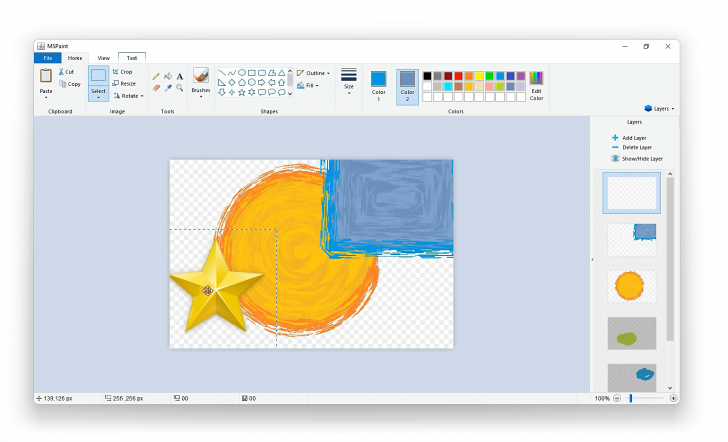
MSPaint (โปรแกรม MS Paint เวอร์ชันอัปเกรดให้ดีกว่าเดิม) : โปรแกรม MSPaint เป็น {โปรแกมวาดรูป} ที่ถูกสร้างขึ้นเพื่อยกระดับขีดความสามารถของ MS Paint เวอร์ชันดั้งเดิม ของ Microsoft ให้มีความทันสมัย และทรงพลังยิ่งขึ้น โดยโปรแกรมนี้ถูกพัฒนาขึ้นด้วย ภาษา Java และใช้ เฟรมเวิร์ก (Framework) Swing ในการจัดการ ส่วนติดต่อผู้ใช้งานแบบกราฟิก (GUI) ทำให้มีคุณสมบัติเด่นคือ สามารถใช้งานได้แบบข้ามแพลตฟอร์ม (Cross-platform) ทั้งบน ระบบปฏิบัติการ (OS) ทั้ง วินโดวส์ (Windows), แมคโอเอส (macOS) และ ลีนุกซ์ (Linux) อย่างเต็มรูปแบบ ซึ่งถือเป็นข้อได้เปรียบเพราะโปรแกรม Paint ต้นฉบับ จะจำกัดการใช้งานอยู่เพียงบน Windows เท่านั้น
ความแตกต่างที่สำคัญอย่างยิ่งของ โปรแกรม MSPaint เมื่อเทียบกับ MS Paint คือ การรองรับระบบ Layers (เลเยอร์) ซึ่งเป็นคุณสมบัติที่มักพบในซอฟต์แวร์ตัดต่อภาพระดับมืออาชีพอย่าง โปรแกรม Adobe Photoshop โดยผู้ใช้สามารถแยกชิ้นส่วนของงานวาดให้อยู่คนละชั้นกันได้ ช่วยให้การแก้ไขงานในส่วนต่างๆ ทำได้ง่ายขึ้น โดยไม่กระทบกับส่วนที่วาดไปแล้ว นอกจากนี้ ยังมาพร้อมกับการรองรับ ไฟล์ PNG ที่สามารถรักษาค่าความโปร่งใส (Transparency) ของภาพไว้ได้ ซึ่งเป็นจุดอ่อนที่ผู้ใช้งาน Paint ยุคเก่ามักจะประสบปัญหาอยู่บ่อยครั้ง
ในด้านการสร้างสรรค์ผลงาน โปรแกรม MSPaint ยังมีระบบ Filters (ฟิลเตอร์) มาให้ในตัว เพื่อให้ผู้ใช้สามารถปรับแต่งเอฟเฟกต์ของภาพได้ทันที รวมถึงมีการปรับปรุงเครื่องมือวาดภาพดั้งเดิมให้มีประสิทธิภาพสูงขึ้น เช่น ระบบจัดการช่องสี Alpha สำหรับความโปร่งใส และการจัดการโครงสร้างพาเนลเลเยอร์ที่ใช้งานง่ายผ่าน JPanel ภายใต้สถาปัตยกรรม JavaSE
คุณสมบัติ และความสามารถของ โปรแกรม MSPaint
- ทำงานข้ามแพลตฟอร์ม สามารถติดตั้ง และใช้งานได้ครอบคลุมทั้งระบบปฏิบัติการ
- Windows
- macOS
- Linux
- มีระบบเลเยอร์ (Layer Support) สามารถในการจัดการชั้นเลเยอร์ (Layers Panel) ช่วยให้ผู้ใช้สามารถวาด หรือแก้ไของค์ประกอบของภาพแยกกันได้
- รองรับไฟล์นามสกุล PNG และช่องสัญญาณ Alpha ทำให้สามารถบันทึก หรือเปิดรูปภาพแบบโปร่งใสได้ โดยไม่สูญเสียคุณภาพ หรือเกิดพื้นหลังสีขาว
- มาพร้อมกับเครื่องมือปรับแต่งภาพหรือฟิลเตอร์ในตัว เพื่อใช้สร้างเอฟเฟกต์พิเศษให้กับภาพวาดได้ทันที
- พัฒนาขึ้นโดยใช้ JavaSE และ Swing Framework ซึ่งทำให้ตัวโปรแกรมมีน้ำหนักเบา และตอบสนองได้รวดเร็วบนระบบปฏิบัติการที่รองรับ Java
- ส่วนต่อประสานกับผู้ใช้ (UI) รักษาความเรียบง่าย และลักษณะการใช้งานแบบ Microsoft Paint ดั้งเดิมเอาไว้ แต่เพิ่มแถบควบคุมและเครื่องมือสำหรับฟีเจอร์ใหม่ ๆ เข้าไปอย่างเป็นสัดส่วน
- รองรับการเลือกสี และปรับค่าความโปร่งใสของสีในแต่ละแปรง หรือเครื่องมือวาดภาพได้แม่นยำยิ่งขึ้น
- รองรับ CUDA และ Torch สำหรับการประมวลผลด้วย หน่วยประมวลผลกราฟิก GPU บนระบบปฏิบัติการ Windows
- และความสามารถอื่น ๆ อีกมากมาย
เงื่อนไขการใช้งาน โปรแกรม MSPaint
โปรแกรม MSPaint เป็นซอฟต์แวร์ ฟรี (Free) ที่พัฒนาแบบ โอเพ่นซอร์ส (Open-Source) ที่อยู่ภายใต้เงื่อนไขการใช้งานแบบ Apache-2.0 License ซึ่งหมายความว่าผู้ใช้สามารถใช้งาน, ดัดแปลง, แจกจ่าย และเข้าถึง โค้ดต้นฉบับ (Source Code) ได้อย่างเสรี ภายใต้เงื่อนไขที่กำหนด
หากต้องการค้นหาข้อมูลเพิ่มเติม สามารถติดต่อกับทางผู้พัฒนาโปรแกรมนี้ได้ผ่านทางช่องทางเว็บไซต์ (Website) : https://github.com/mohitsainiknl/MSPaint (ภาษาอังกฤษ) ได้เลย
คำบรรยายภาษาอังกฤษ (English Descriptions)
MSPaint is a drawing software created to enhance and elevate the capabilities of the original Microsoft Paint, making it more modern and powerful. Developed using Java and the Swing framework for its Graphical User Interface (GUI), the program stands out with its cross-platform compatibility, offering full support for Windows, macOS, and Linux. This provides a significant advantage over the original Paint, which is strictly limited to the Windows operating system.
A key differentiator of this MSPaint version compared to the standard MS Paint is its support for a Layer system—a feature typically found in professional image editing software like Adobe Photoshop. This allows users to separate different elements of their artwork onto distinct layers, making it easier to edit specific parts without affecting the rest of the drawing. Furthermore, it includes support for PNG files with transparency, addressing a major limitation that users of the classic Paint often encountered.
 คำสำคัญ

โปรแกรมที่เกี่ยวข้อง !







ความคิดเห็น ()


ซอฟต์แวร์ไทย
Thai Software
ซอฟต์แวร์ฟรี
Freeware
ซอฟต์แวร์สามัญ
First AID
ซอฟต์แวร์แนะนำ
Recommended
สูงสุดในสัปดาห์
Top Download
สูงสุดตลอดกาล
Hall of Fame
Submit Software
บริการเช็คความเร็วเน็ต (Speedtest) และ เช็คไอพี (Check IP)
 เช็คความเร็วเน็ต
 เช็คไอพี


Thaiware.com is owned and operated by Thaiware Communication Co., Ltd.