
 ซอฟต์แวร์
 แอปพลิเคชันบนมือถือ
 เช็คความเร็วเน็ต (Speedtest)
 เช็คไอพี (Check IP)
 เช็คเลขพัสดุ
 สุ่มออนไลน์
 เครื่องมือคำนวณวันออนไลน์
PDFCore (โปรแกรมจัดการ PDF ครบวงจร ทำงานในเครื่อง ปลอดภัย)

ข้อมูลทั่วไป ก่อน ดาวน์โหลดโปรแกรม
 Windows
โปรแกรม PDFCore

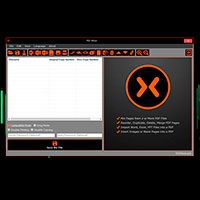
PDFCore (โปรแกรมจัดการ PDF ครบวงจร, ทำงานในเครื่อง และปลอดภัย) : PDFCore เป็นโปรแกรมจัดการ และแก้ไข ไฟล์เอกสาร PDF ที่ถูกออกแบบมาเพื่อใช้งานบน ระบบปฏิบัติการ (OS) ยอดฮิตอย่าง วินโดวส์ (Windows) 10 และ Windows 11 รองรับ สถาปัตยกรรม x64 โดยเฉพาะ จุดเด่นที่สุดของโปรแกรมนี้คือแนวคิดการทำงานแบบ Offline / Local Processing 100% ซึ่งหมายความว่ากระบวนการประมวลผลทั้งหมด ไม่ว่าจะเป็นการแปลงไฟล์, การสแกน หรือการแก้ไข จะเกิดขึ้นภายในเครื่องคอมพิวเตอร์ของคุณเองเท่านั้น โดยไม่มีการส่งข้อมูลหรืออัปโหลดไฟล์ขึ้นสู่ คลาวด์ (Cloud) ไม่มีระบบบัญชีผู้ใช้ให้ต้องลงทะเบียน ไม่มีการแอบเก็บข้อมูลการใช้งาน (Telemetry) และไม่มีโฆษณาแอบแฝง ทำให้เหมาะอย่างยิ่งสำหรับบุคคล หรือองค์กรที่ต้องทำงานกับเอกสารลับ, ข้อมูลส่วนบุคคล หรือเอกสารทางธุรกิจที่เข้มงวดเรื่องความปลอดภัย
ในด้านฟังก์ชันการทำงานโปรแกรม PDFCore รวบรวมเครื่องมือสำคัญไว้อย่างครบถ้วน โดยมีหัวใจหลักคือระบบแปลงไฟล์ PDF เป็น Word (DOCX) ที่ไม่จำเป็นต้องมีโปรแกรม Microsoft Word ติดตั้งอยู่ในเครื่อง โปรแกรมนี้โดดเด่นด้วยการเปิดโอกาสให้ผู้ใช้เลือกโหมดการแปลงได้ตามโครงสร้างเอกสารจริง เช่น โหมด Editable Layout สำหรับเอกสารทั่วไปที่เน้นปรับแต่งข้อความและตารางได้ง่าย โหมด Precise Layout สำหรับหน้าเอกสารที่มีดีไซน์ซับซ้อนเพื่อรักษาตำแหน่งองค์ประกอบให้เหมือนต้นฉบับมากที่สุด และโหมด Flowing Text ที่เหมาะสำหรับการดึงเฉพาะข้อความมาอ่านหรือแก้ไขใหม่ และหากเอกสารต้นฉบับเป็นไฟล์ที่เกิดจากการสแกน โปรแกรมจะมีระบบ การรู้จำอักขระด้วยแสง (OCR) อยู่ในตัว เพื่อตรวจจับตัวอักษรจากภาพแล้วแปลงให้เป็นข้อความที่ค้นหาหรือแก้ไขได้ทันที
นอกจากระบบแปลงไฟล์แล้ว โปรแกรม PDFCore ยังรองรับการบริหารจัดการหน้าเอกสารอย่างครอบคลุม ทั้งการรวมไฟล์ PDF หลายไฟล์พร้อมกัน, การแยกหน้าตามช่วงที่กำหนด, การแทรก, ลบ, หมุน ครอบตัด (Crop) และจัดเรียงลำดับหน้าใหม่ รวมถึงเครื่องมือตกแต่งเอกสาร เช่น การเพิ่มข้อความ, รูปภาพ, ลิงก์, ไฮไลต์, ตราปั๊ม, รอยเซ็น, การเพิ่มหัว/ท้ายกระดาษ และการสร้างบุ๊กมาร์ก สำหรับการจัดการไฟล์ในเชิงลึก โปรแกรมมีระบบบีบอัดขนาดไฟล์ที่ยังคงความคมชัดของข้อความเดิมไว้ หรือเลือกรวมชั้นข้อมูลให้เป็นไฟล์ภาพเพื่อลดขนาดขั้นสุด ตลอดจนระบบความปลอดภัยอย่างการใส่รหัสผ่านล็อกการเปิด/แก้ไขไฟล์, การกำหนดสิทธิ์การพิมพ์ และฟังก์ชัน Redaction สำหรับลบข้อมูลสำคัญ หรือข้อความส่วนตัวออกจากไฟล์อย่างถาวรโดยไม่สามารถดึงกลับมาได้อีก
คุณสมบัติ และความสามารถของ โปรแกรม PDFCore
คุณสมบัติหลัก และการทำงาน
- ประมวลผลภายในเครื่อง 100% ทำงานแบบ Offline บนคอมพิวเตอร์ของคุณเอง ไม่มีการอัปโหลดไฟล์ขึ้นระบบคลาวด์ ปลอดภัยสำหรับเอกสารความลับ
- ไม่มีการเก็บข้อมูล, ไม่มีระบบสมาชิก, ไม่มีการเก็บบันทึกประวัติการใช้งาน (No Telemetry) และไม่มีโฆษณาแอบแฝง
- เปิดให้ใช้งานได้ฟรีทั้งการทำงานส่วนตัวและงานเชิงพาณิชย์
- ออกแบบมาสำหรับ Windows 10 และ Windows 11
การแปลงไฟล์ และระบบ OCR
- แปลง PDF เป็น Word (DOCX) ได้โดยตรงโดยไม่จำเป็นต้องติดตั้งโปรแกรม Microsoft Word ไว้ในเครื่อง
- โหมด Editable Layout เน้นการปรับสมดุลระหว่างโครงสร้างเดิมกับการแก้ไขข้อความ และตารางได้ง่าย
- โหมด Precise Layout เน้นจัดวางตำแหน่งองค์ประกอบ, กราฟิก และข้อความให้ตรงตามต้นฉบับมากที่สุด
- โหมด Flowing Text เน้นดึงเฉพาะเนื้อหาข้อความออกมาเพื่อการอ่าน และเขียนใหม่ที่สะดวก
- ระบบ Local OCR แปลงเอกสารสแกน หรือไฟล์รูปภาพให้กลายเป็น PDF ที่ค้นหาข้อความได้ หรือแปลงเป็นข้อความ และไฟล์ Word เพื่อนำไปแก้ไขต่อ
การจัดการหน้า และโครงสร้างเอกสาร
- รวม PDF หลายไฟล์เข้าด้วยกัน หรือเลือกแยกเฉพาะบางหน้า/ช่วงหน้าที่ต้องการ
- จัดเรียงหน้าเอกสาร, หมุนหน้า, แทรกหน้าใหม่, ลบหน้าที่ไม่ต้องการ, ครอบตัด (Crop) และสลับลำดับหน้าได้ตามใจชอบ
- องค์ประกอบเสริม ใส่หัวกระดาษ, ท้ายกระดาษ, หมายเลขหน้า, ลายน้ำ, บุ๊กมาร์ก (Bookmarks) และลิงก์เชื่อมโยงภายในเอกสาร
การแก้ไข, เพิ่มเติม และตกแต่ง
- เครื่องมือตรวจทาน เพิ่มข้อความ, ไฮไลต์, ขีดเส้นใต้ โน้ตย่อ (Comments) และใส่รูปภาพประกอบ
- ใส่ตราปั๊ม (Stamps), เอกสาร และสร้างการแสดงผล ลายเซ็นอิเล็กทรอนิกส์ (E-Signature)
การบีบอัด และรักษาความปลอดภัย
- ย่อขนาดไฟล์ PDF ให้เล็กลงโดยยังคงความคมชัดของข้อความ และโครงสร้างเดิม หรือเลือกแปลงเป็นไฟล์ภาพเพื่อย่อขนาดสูงสุด
- ตั้งรหัสผ่านสำหรับเปิดอ่าน (Open Password) หรือรหัสผ่านสิทธิ์การแก้ไข/พิมพ์เอกสาร (Owner Password)
- เซนเซอร์ และลบข้อความหรือข้อมูลส่วนบุคคลออกจากไฟล์อย่างถาวร ไม่สามารถกู้คืน หรือถอดรหัสกลับมาดูได้อีก
และความสามารถอื่น ๆ อีกมากมาย
เงื่อนไขการใช้งาน โปรแกรม PDFCore
โปรแกรม PDFCore เป็นซอฟต์แวร์ที่ทางผู้พัฒนาใจดี แจกจ่ายให้ผู้ที่สนใจสามารถดาวน์โหลดไปใช้งานได้ฟรี
หากต้องการค้นหาข้อมูลเพิ่มเติม สามารถติดต่อกับทางผู้พัฒนาโปรแกรมนี้ได้ผ่านทางช่องทางเว็บไซต์ (Website) : https://pdfcore.com/ (ภาษาอังกฤษ) ได้เลย
คำบรรยายภาษาอังกฤษ (English Descriptions)
PDFCore is a PDF document management and editing program specifically designed for 64-bit Windows 10 and Windows 11 operating systems. Its key highlight is a 100% offline and local processing model, meaning every operation whether converting, scanning, or editing takes place entirely on your personal computer. Files are never uploaded to the cloud, no user account registration is required, and there is zero telemetry tracking or hidden advertising. This makes it an ideal solution for individuals and organizations handling sensitive documents, personal data, or strictly confidential business records.
When it comes to core functionality, PDFCore offers a comprehensive suite of essential tools, centered around a powerful PDF-to-Word (DOCX) conversion engine that operates without requiring Microsoft Word to be installed on your machine. The software stands out by allowing users to select conversion modes tailored to their document's structure, including Editable Layout for standard files needing easy text and table edits, Precise Layout for complex designs where visual elements must match the original, and Flowing Text for extracting readable, rewritable content. For scanned documents, it features built-in Windows OCR (Optical Character Recognition) to detect text within images and instantly turn them into searchable or editable documents.
Beyond file conversion, PDFCore provides extensive page management capabilities, such as merging multiple PDFs, splitting pages by range, as well as inserting, deleting, rotating, cropping, and reordering pages. It also includes annotation and editing tools to add text, images, links, highlights, stamps, signatures, headers, footers, and bookmarks. For advanced file handling, the software offers smart compression to reduce file size while preserving text clarity or fully rasterizing pages into image formats for maximum compression alongside robust security features like password protection, permission controls, and permanent redaction to securely erase sensitive information beyond recovery.
 คำสำคัญ

โปรแกรมที่เกี่ยวข้อง !



ความคิดเห็น ()


ซอฟต์แวร์ไทย
Thai Software
ซอฟต์แวร์ฟรี
Freeware
ซอฟต์แวร์สามัญ
First AID
ซอฟต์แวร์แนะนำ
Recommended
สูงสุดในสัปดาห์
Top Download
สูงสุดตลอดกาล
Hall of Fame
Submit Software
บริการเช็คความเร็วเน็ต (Speedtest) และ เช็คไอพี (Check IP)
 เช็คความเร็วเน็ต
 เช็คไอพี


Thaiware.com is owned and operated by Thaiware Communication Co., Ltd.