
 ซอฟต์แวร์
 แอปพลิเคชันบนมือถือ
 เช็คความเร็วเน็ต (Speedtest)
 เช็คไอพี (Check IP)
 เช็คเลขพัสดุ
 สุ่มออนไลน์
 เครื่องมือคำนวณวันออนไลน์
kitty (โปรแกรม Terminal สำหรับสาย Custom และ Power User)
ข้อมูลทั่วไป ก่อน ดาวน์โหลดโปรแกรม
 macOS
macOS Linux / FreeBSD
โปรแกรม kitty
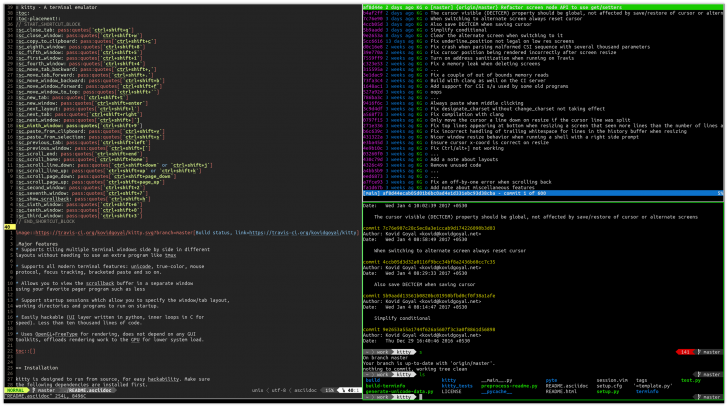
kitty (โปรแกรม Terminal สำหรับสาย Custom และ Power User) : โปรแกรม kitty เป็นโปรแกรมจำลองหน้าจอคำสั่ง หรือ Terminal Emulator ที่ถูกพัฒนาขึ้นมาโดย Kovid Goyal นักพัฒนาผู้สร้างโปรแกรมจัดการ อีบุ๊ก (E-Book) ชื่อดังอย่าง โปรแกรม Calibre โดยมีเป้าหมายหลักในการเป็น Terminal ที่ประมวลผลเร็วที่สุด, ทันสมัยที่สุด และปรับแต่งได้ยืดหยุ่นที่สุดสำหรับ ระบบปฏิบัติการ (OS) ลีนุกซ์ (Linux) และ แมคโอเอส (macOS) และระบบในตระกูล ยูนิกซ์ (UNIX) ต่างๆ เหมาะเป็นอย่างยิ่งสำหรับกลุ่มนักพัฒนาซอฟต์แวร์ ผู้ดูแลระบบ (SysAdmin) และผู้ใช้งานสาย Power User ที่ต้องทำงานอยู่บน ส่วนติดต่อผู้ใช้แบบบรรทัดคำสั่ง (CLI) เป็นหลักตลอดทั้งวัน
ความพิเศษที่ทำให้ โปรแกรม kitty แตกต่างจาก Terminal ทั่วไปอย่างชัดเจนคือ สถาปัตยกรรมระบบที่ใช้ประโยชน์จาก กราฟิกการ์ด (GPU) ผ่าน OpenGL ในการเรนเดอร์ข้อความ และหน้าจอทั้งหมด การดึงพลังการประมวลผลของการ์ดจอมาใช้แทน หน่วยประมวลผลกลาง (CPU) ทำให้โปรแกรม kitty สามารถแสดงผลข้อความ, เลื่อนหน้าจอ และตอบสนองต่อการพิมพ์ได้อย่างรวดเร็ว, ไหลลื่น, ไม่มีอาการหน่วง แม้ในภาวะที่มีการ output ข้อความขนาดใหญ่ หรือไฟล์ บันทึกประวัติการทำงาน (Log) ความยาวหลายแสนบรรทัดออกมาพร้อมกัน
ในแง่โครงสร้างการพัฒนา โปรแกรม kitty ถูกออกแบบมาอย่างลงตัวด้วยการผสมผสาน 3 ภาษาคอมพิวเตอร์เข้าด้วยกัน คือใช้ ภาษา C สำหรับส่วนประมวลผลที่ต้องการความเร็วสูง (Core Engine) ใช้ ภาษา Python ในส่วนโครงสร้าง ส่วนต่อประสานกับผู้ใช้ (UI) และสคริปต์ ส่วนขยาย (Extension) เพื่อให้ผู้ใช้สามารถแกะ, แก้ไข หรือเขียนโค้ดต่อเติมฟีเจอร์ได้ง่าย และใช้ ภาษา Go สำหรับเครื่องมือเสริมเฉพาะทางที่เรียกว่า Kittens นอกจากนี้ โปรแกรม kitty ยังจงใจไม่พึ่งพา UI Toolkit ขนาดใหญ่ เช่น GTK หรือ Qt ทำให้ตัวโปรแกรมมีความเบา, ไม่กินทรัพยากรส่วนเกิน และไม่ซับซ้อน
จุดเด่นด้านฟีเจอร์ และการแสดงผล โปรแกรม kitty รองรับมาตรฐานเทคโนโลยีข้อความยุคใหม่เต็มรูปแบบ ไม่ว่าจะเป็นระบบสีระดับ True Color (24-bit), ระบบ ฟอนต์ (Font) Unicode, ข้อความตัวหนา ตัวเอียง, ฟอนต์ลิกาเจอร์ (Font Ligatures) หรือการเชื่อมสัญลักษณ์โค้ดเข้าด้วยกัน, ไปจนถึงการขยายมาตรฐาน Escape Code เพื่อรองรับลูกเล่นตกแต่งข้อความที่ไม่เคยมีใน Terminal อื่น เช่น การขีดเส้นใต้แบบหยัก (Curly Underline), การใส่สีให้เส้นใต้แยกต่างหากจากตัวอักษร หรือแม้กระทั่งความสามารถในการแสดงผลรูปภาพความละเอียดสูง ลงบนหน้าจอ Terminal ได้โดยตรง
ด้านการควบคุม และการบริหารจัดการ โปรแกรม kitty ออกแบบมาเพื่อเน้นการใช้งานผ่าน คีย์บอร์ด (Keyboard) เป็นหลัก, มีระบบการแบ่งหน้าต่าง (Tiling/Layouts) และการเปิดแท็บในตัว ทำให้ผู้ใช้จัดสรรพื้นที่ทำงานหลาย ๆ หน้าจอพร้อมกันได้โดยไม่ต้องพึ่งพาซอฟต์แวร์อย่าง tmux ขณะเดียวกัน การตั้งค่าตัวโปรแกรม (Configuration) ทั้งหมดจะถูกรวบรวมไว้ในไฟล์ข้อความธรรมดาเพียงไฟล์เดียวชื่อ kitty.conf ซึ่งอ่าน และแก้ไขได้ง่าย ช่วยให้ผู้ใช้สามารถนำไฟล์การตั้งค่านี้ไปจัดเก็บใน Source Control เช่น Git เพื่อย้ายไปใช้งานบนเครื่องอื่น หรือสำรองข้อมูลได้อย่างสะดวกสบาย
นอกจากนี้ยังมีระบบนิเวศส่วนขยายที่เรียกว่า Kittens ซึ่งเป็นโปรแกรมย่อยที่ช่วยเพิ่มฟังก์ชันขั้นสูง เช่น การดูภาพตัวอย่างใน Terminal, การจัดการ Clipboard ข้ามเครื่องขณะเชื่อมต่อ Secure Shell (SSH), การเปรียบเทียบความแตกต่างของไฟล์ (Diff Tool), การเลือกธีมสีแบบโต้ตอบ และการโคลนเซสชันการทำงานข้ามระบบ ทั้งหมดนี้ทำให้ kitty กลายเป็นหนึ่งใน Terminal Emulator ที่ทรงพลัง และได้รับความนิยมสูง
คุณสมบัติ และความสามารถของ โปรแกรม kitty
สถาปัตยกรรม และการประมวลผล
- ประมวลผลด้วย GPU ผ่าน OpenGL ดึงพลังการ์ดจอมาใช้เรนเดอร์ข้อความ และภาพบนหน้าจอโดยตรง ทำให้สโครลหน้าจอได้ลื่นไหล, ตอบสนองต่อการพิมพ์อย่างรวดเร็ว และไม่กินทรัพยากร CPU
- โครงสร้างโค้ดแบบไฮบริด พัฒนาด้วยภาษา C ในส่วน Engine หลักเพื่อความเร็วสูงสุด ใช้ Python จัดการโครงสร้าง UI เพื่อให้แก้ไข และเขียนส่วนขยายได้ง่าย และใช้ Go สำหรับโปรแกรมย่อย (Kittens)
- ไม่พึ่งพาไลบรารี UI ขนาดใหญ่ เช่น GTK หรือ Qt ทำให้โปรแกรมเปิดได้ไว, ใช้ทรัพยากรน้อย และทำงาน cross-platform ได้อย่างเสถียร
- มุ่งเน้นการเป็น Terminal สำหรับนักพัฒนา และผู้ใช้ระดับสูง (Power Users)
ระบบการแสดงผล และฟอนต์
- แสดงผลสีได้ถึงระดับ True Color (24-bit) พร้อมรองรับโปรไฟล์สี และการไล่ระดับสีที่แม่นยำ
- รองรับเทคโนโลยีฟอนต์สมัยใหม่ แสดงผล Unicode, ข้อความตัวหนา, ตัวเอียง และ Font Ligatures (สัญลักษณ์โค้ดแบบเชื่อมตัวอักษร) ได้อย่างสมบูรณ์
- รองรับการตกแต่งข้อความพิเศษ เช่น
- เส้นใต้แบบหยัก (Curly Underlines)
- เส้นใต้แบบจุด/ลอน
- ใส่สีให้เส้นใต้แยกจากตัวอักษร
- แสดงผลรูปภาพความละเอียดสูง รองรับการเปิดดูภาพไฟล์ PNG, JPEG, GIF บนหน้าจอ Terminal ได้โดยตรงโดยไม่ต้องแปลงเป็น ASCII Art
การใช้งาน และการปรับแต่ง
- ออกแบบทุกฟังก์ชันให้สั่งงานผ่าน คีย์บอร์ด (Keyboard) ได้ทั้งหมด พร้อมรองรับการคลิก และ เมาส์ (Mouse) วีล
- มีระบบแบ่งหน้าจอ (Tiling) และระบบแท็บในตัว สามารถจัด Layout หน้าจอได้หลายรูปแบบโดยไม่ต้องติดตั้งซอฟต์แวร์เสริมอย่าง tmux
- เก็บค่าการตั้งค่าทั้งหมดไว้ในไฟล์ kitty.conf เพียงไฟล์เดียว, อ่านง่าย, แก้ไขสะดวก และนำไปเก็บใน Git/Source Control เพื่อย้ายไปใช้เครื่องอื่นได้ทันที
- มีระบบ Utility เสริมในตัว เช่น
- เครื่องมือเปรียบเทียบไฟล์ (Diff)
- เครื่องมือเลือกธีมสี (Themes)
- การเปิด SSH ที่ซิงค์ไฟล์ตั้งค่าไปยังเครื่องปลายทาง
- เครื่องมือจัดการ Clipboard ข้ามระบบ
และความสามารถอื่น ๆ อีกมากมาย
เงื่อนไขการใช้งาน โปรแกรม kitty
โปรแกรม kitty เป็นซอฟต์แวร์ ฟรี (Free) ที่พัฒนาแบบ โอเพ่นซอร์ส (Open-Source) ที่อยู่ภายใต้เงื่อนไขการใช้งานแบบ GNU GENERAL PUBLIC LICENSE Version 3 ซึ่งหมายความว่าผู้ใช้สามารถใช้งาน, ดัดแปลง, แจกจ่าย และเข้าถึง โค้ดต้นฉบับ (Source Code) ได้อย่างเสรี ภายใต้เงื่อนไขที่กำหนด
หากต้องการค้นหาข้อมูลเพิ่มเติม สามารถติดต่อกับทางผู้พัฒนาโปรแกรมนี้ได้ผ่านทางช่องทางเว็บไซต์ (Website) : https://sw.kovidgoyal.net/kitty/ (ภาษาอังกฤษ) ได้เลย
คำบรรยายภาษาอังกฤษ (English Descriptions)
kitty is a terminal emulator developed by Kovid Goyal, the creator of the famous e-book management software Calibre. Its primary goal is to be the fastest, most modern, and most flexibly customizable terminal for Linux, macOS, and various UNIX-family operating systems. It is exceptionally well-suited for software developers, system administrators (SysAdmins), and power users who work extensively within command-line interfaces (CLI) throughout the day.
What clearly sets kitty apart from traditional terminals is its system architecture, which leverages the GPU via OpenGL to render all text and screens. Offloading processing tasks to the graphics card instead of relying solely on the CPU allows kitty to display text, scroll through screens, and respond to keystrokes rapidly and smoothly without lag, even when outputting massive amounts of text or log files containing hundreds of thousands of lines simultaneously.
In terms of development structure, kitty is seamlessly designed by blending three programming languages. It uses C for the high-speed core processing engine, Python for the user interface structure and extension scripts enabling users to inspect, modify, or write code to extend features easily and Go for specialized built-in utility tools called Kittens. Furthermore, kitty intentionally avoids relying on large UI toolkits such as GTK or Qt, keeping the software lightweight, resource-efficient, and uncluttered.
Regarding features and rendering, kitty fully supports modern text technology standards, including True Color (24-bit) display, Unicode fonts, bold and italic text, font ligatures, and extended Escape Code standards that enable text decorations unavailable in other terminals. These include curly underlines, custom underline coloring independent of text color, and even the ability to display high-resolution images directly on the terminal screen.
For control and management, kitty is built with a keyboard-first design ethos. It features native window tiling/layouts and tab management, allowing users to organize multiple workspaces concurrently without needing external software like tmux. Meanwhile, all software configuration is consolidated into a single plain-text file named kitty.conf, which is easy to read and edit. This enables users to store their settings in source control platforms like Git for seamless backup and cross-device migration.
Additionally, it features an extension ecosystem known as Kittens specialized sub-programs that provide advanced functionality such as image previews inside the terminal, cross-machine clipboard management over Secure Shell (SSH) connections, a built-in diff tool for file comparison, interactive color theme selection, and cross-system session cloning. All of these features combine to make kitty one of the most powerful and popular terminal emulators available.
 คำสำคัญ

โปรแกรมที่เกี่ยวข้อง !





ความคิดเห็น ()


ซอฟต์แวร์ไทย
Thai Software
ซอฟต์แวร์ฟรี
Freeware
ซอฟต์แวร์สามัญ
First AID
ซอฟต์แวร์แนะนำ
Recommended
สูงสุดในสัปดาห์
Top Download
สูงสุดตลอดกาล
Hall of Fame
Submit Software
บริการเช็คความเร็วเน็ต (Speedtest) และ เช็คไอพี (Check IP)
 เช็คความเร็วเน็ต
 เช็คไอพี


Thaiware.com is owned and operated by Thaiware Communication Co., Ltd.