
 ซอฟต์แวร์
 แอปพลิเคชันบนมือถือ
 เช็คความเร็วเน็ต (Speedtest)
 เช็คไอพี (Check IP)
 เช็คเลขพัสดุ
 สุ่มออนไลน์
 เครื่องมือคำนวณวันออนไลน์
CopyFolders 2 (โปรแกรมสำรองข้อมูล หรือคัดลอกไฟล์ข้ามโฟลเดอร์)
ข้อมูลทั่วไป ก่อน ดาวน์โหลดโปรแกรม
 Windows
โปรแกรม CopyFolders 2
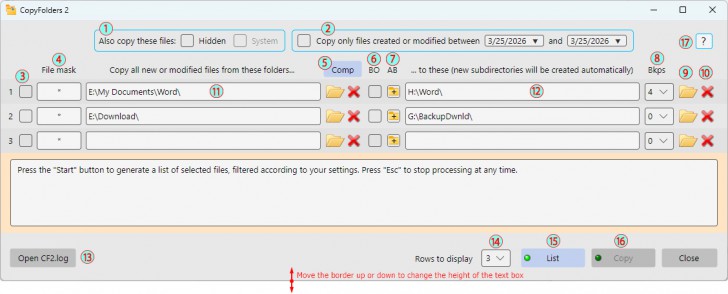
CopyFolders 2 (โปรแกรมสำรองข้อมูล หรือคัดลอกไฟล์ข้ามโฟลเดอร์) : โปรแกรม CopyFolders 2 เป็นโปรแกรมอรรถประโยชน์สำหรับ ระบบปฏิบัติการ (OS) ยอดฮิตอย่าง วินโดวส์ (Windows) โดยความสามารถของโปรแกรมนี้คือ การเป็นเครื่องมือช่วยสำรองข้อมูล และคัดลอกไฟล์อย่างชาญฉลาด ซึ่งจะทำการตรวจจับ และคัดลอกเฉพาะไฟล์ที่เพิ่มขึ้นมาใหม่ หรือไฟล์ที่มีการแก้ไขล่าสุดเท่านั้น โดยไม่คัดลอกไฟล์เดิมซ้ำเพื่อช่วยประหยัดเวลา และพื้นที่จัดเก็บ
โครงสร้างการทำงานของโปรแกรม CopyFolders 2 คือ จะให้ผู้ใช้งานสามารถตั้งค่าจับคู่โฟลเดอร์ต้นทาง และปลายทางได้พร้อมกันสูงสุดถึง 9 คู่โฟลเดอร์ โดยมีกระบวนการทำงานที่ปลอดภัยด้วยการแบ่งเป็นสองขั้นตอนหลัก เริ่มจากการกดปุ่มเพื่อสั่งให้ระบบค้นหา และแสดงรายการไฟล์ทั้งหมดที่เข้าเงื่อนไขออกเป็นรายงานใน การจัดเก็บข้อมูลจราจรทางคอมพิวเตอร์ (Log File) ก่อน จากนั้นเมื่อผู้ใช้ตรวจสอบความถูกต้องเรียบร้อยแล้วจึงค่อยกดปุ่มเพื่อเริ่มกระบวนการคัดลอกไฟล์ไปยังปลายทางจริง ส่งผลให้โปรแกรมนี้สามารถประยุกต์ใช้เป็นเครื่องมือค้นหาไฟล์แบบด่วนตามวันที่ หรือตามเงื่อนไขที่กำหนดได้อีกด้วย
นอกจากนี้โปรแกรม CopyFolders 2 ยังมีคุณสมบัติขั้นสูงในการบริหารจัดการไฟล์ เช่น ระบบตัวกรองไฟล์ด้วยการใช้เครื่องหมายสัญกรณ์, การตั้งค่าให้คัดลอกเฉพาะโฟลเดอร์หลักโดยไม่รวมโฟลเดอร์ย่อย, การเปิดปิดฟังก์ชันให้คัดลอกไฟล์ระบบ หรือไฟล์ที่ถูกซ่อนอยู่เพื่อใช้ในการทำแผ่นบูต หรือ แฟลชไดร์ฟ (Flash Drive) สำหรับติดตั้งระบบปฏิบัติการ รวมถึงระบบสำรองข้อมูลย้อนหลังที่สามารถเลือกเก็บไฟล์เวอร์ชันเก่าก่อนการแก้ไขไว้ได้สูงสุดถึง 6 เวอร์ชัน โดยโปรแกรมมีข้อจำกัดเพียงเล็กน้อยคือ จะไม่ยุ่งเกี่ยวกับโฟลเดอร์ระบบของ Windows โดยตรง และจำกัดปริมาณการประมวลผลไฟล์ไว้ด้วย โดยขึ้นอยู่กับหน่วยความจำของคอมพิวเตอร์ที่ใช้งาน
คุณสมบัติ และความสามารถของ โปรแกรม CopyFolders 2
- โปรแกรมจะตรวจสอบ และเลือกคัดลอกเฉพาะไฟล์ที่ยังไม่มีในโฟลเดอร์ปลายทาง หรือไฟล์ที่มีการเปลี่ยนแปลงล่าสุดเท่านั้น ช่วยประหยัดเวลา และพื้นที่จัดเก็บข้อมูล
- ผู้ใช้สามารถจับคู่โฟลเดอร์ต้นทาง และปลายทาง ได้พร้อมกันสูงสุดถึง 9 คู่ในหน้าต่างเดียว และสามารถเลือกเปิด-ปิดการใช้งานแต่ละแถวได้อย่างอิสระ
- ระบบทำงานแบบ 2 ขั้นตอนเพื่อความปลอดภัย
- ขั้นตอนแรก (List): โปรแกรมจะทำการสแกน และสร้างรายชื่อไฟล์ที่เข้าเงื่อนไขออกเป็นรายงาน (.log) ให้ผู้ใช้ตรวจสอบก่อน โดยสามารถค้นหาไฟล์ด่วนตามวันที่ หรือเงื่อนไขได้อย่างรวดเร็ว
- ขั้นตอนที่สอง (Copy): คัดลอกไฟล์จริงหลังจากที่ผู้ใช้งานตรวจสอบความถูกต้องของรายชื่อไฟล์เรียบร้อยแล้ว
- สามารถตั้งค่าให้บันทึกไฟล์เวอร์ชันเก่าก่อนการแก้ไขย้อนหลังได้สูงสุดถึง 6 เวอร์ชัน เหมาะสำหรับการปกป้องไฟล์เอกสารสำคัญ เช่น .docx หรือ .xlsx ไม่ให้ถูกเขียนทับจนกู้คืนไม่ได้
- รองรับการใช้เครื่องหมาย Wildcards เพื่อกรองเฉพาะประเภทไฟล์ หรือชื่อไฟล์ที่ต้องการคัดลอกได้อย่างแม่นยำ
- ผู้ใช้สามารถเลือกเปิดฟังก์ชันคัดลอกไฟล์ซ่อน (Hidden) หรือไฟล์ระบบ (System) ได้ เพื่อนำไปใช้ในการทำแฟลชไดรฟ์ติดตั้ง Windows หรือทำ Multiboot USB
- เลือกคัดลอกเฉพาะไฟล์ที่อยู่ในโฟลเดอร์หลักชั้นนอกสุด โดยไม่เอาไฟล์ในโฟลเดอร์ย่อย (Subfolders)
- ะบบจะสร้างโฟลเดอร์ปลายทางให้โดยอัตโนมัติอ้างอิงตามชื่อโฟลเดอร์ต้นทาง โดยที่ผู้ใช้ไม่จำเป็นต้องกดสร้างโฟลเดอร์ใหม่เอง
- หากโฟลเดอร์ปลายทางถูกลบโดยไม่ตั้งใจ โปรแกรมจะทำการสร้างโฟลเดอร์นั้นขึ้นมาใหม่ให้โดยอัตโนมัติ
- ปุ่มสำหรับล้างแถวที่ว่าง และจัดเรียงแถวที่มีข้อมูลให้กระชับโดยอัตโนมัติ
- ไม่รองรับการคัดลอกพาร์ทิชัน และจะไม่ยุ่งเกี่ยวกับโฟลเดอร์ระบบพิเศษบางประเภท เช่น
- System Volume Information
- WinSxS
- $RECYCLE.BIN
- ไฟล์ระบบที่มีการคุ้มครองสิทธิ์ขั้นสูง (Protected system files)
- และความสามารถอื่น ๆ อีกมากมาย
เงื่อนไขการใช้งาน โปรแกรม CopyFolders 2
โปรแกรม CopyFolders 2 เป็นซอฟต์แวร์ ฟรี (Free) ที่สามารถใช้งานได้โดยไม่มีค่าใช้จ่าย และโฆษณา
หากต้องการค้นหาข้อมูลเพิ่มเติม สามารถติดต่อกับทางผู้พัฒนาโปรแกรมนี้ได้ผ่านทางช่องทางเว็บไซต์ (Website) : https://psmate.com/Help/CF2/intro.html (ภาษาอังกฤษ) ได้เลย
คำบรรยายภาษาอังกฤษ (English Descriptions)
CopyFolders 2 is a utility program for operating systems (OS) designed as an intelligent backup and file copying tool. It automatically detects and copies only newly added or recently modified files, eliminating redundant copying of unchanged files to save both time and storage space.
The operational structure of CopyFolders 2 allows users to pair up to 9 pairs of origin and destination folders simultaneously. It features a secure workflow divided into two main steps: it begins with a button press that commands the system to scan and generate a comprehensive list of all matching files into a log file, and once the user verifies the accuracy of the report, another button is pressed to initiate the actual file transfer to the destination. Consequently, this program can also be utilized as a quick file-searching tool based on specific dates or predefined criteria.
Furthermore, CopyFolders 2 offers advanced file management features, such as a wildcard filtering system, settings to copy only the main folder while excluding subfolders, and options to toggle the copying of hidden or system files for creating bootable discs or operating system installation flash drives. It also includes a file versioning backup system that can preserve up to 6 previous versions of a file before it was modified. The program carries only a few limitations, as it does not directly interfere with core Windows system folders and has a file processing limit that depends entirely on the memory capacity of the computer in use.
 คำสำคัญ

โปรแกรมที่เกี่ยวข้อง !







ความคิดเห็น ()


ซอฟต์แวร์ไทย
Thai Software
ซอฟต์แวร์ฟรี
Freeware
ซอฟต์แวร์สามัญ
First AID
ซอฟต์แวร์แนะนำ
Recommended
สูงสุดในสัปดาห์
Top Download
สูงสุดตลอดกาล
Hall of Fame
Submit Software
บริการเช็คความเร็วเน็ต (Speedtest) และ เช็คไอพี (Check IP)
 เช็คความเร็วเน็ต
 เช็คไอพี


Thaiware.com is owned and operated by Thaiware Communication Co., Ltd.