
 ซอฟต์แวร์
 แอปพลิเคชันบนมือถือ
 เช็คความเร็วเน็ต (Speedtest)
 เช็คไอพี (Check IP)
 เช็คเลขพัสดุ
 สุ่มออนไลน์
 เครื่องมือคำนวณวันออนไลน์
coconutBattery 4 (โปรแกรมเช็คสุขภาพแบตเตอรี่ MacBook, iPhone และ iPad)

ข้อมูลทั่วไป ก่อน ดาวน์โหลดโปรแกรม
 macOS
macOS
โปรแกรม coconutBattery
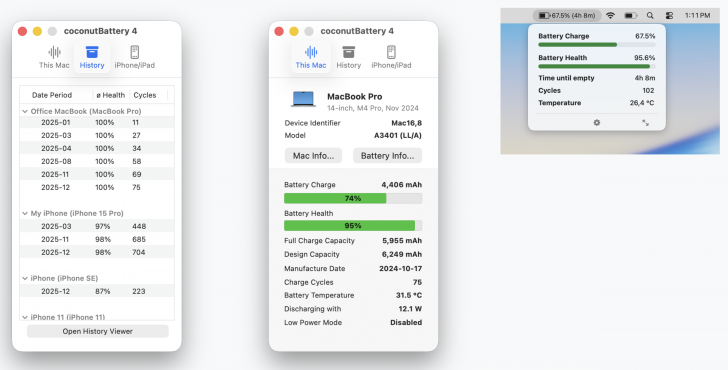
coconutBattery 4 (โปรแกรมเช็คสุขภาพแบตเตอรี่ MacBook, iPhone และ iPad) : โปรแกรม coconutBattery 4 เป็นโปรแกรมยอดนิยมที่ถูกพัฒนาขึ้นมาตั้งแต่ปี ค.ศ. 2005 (พ.ศ. 2548) เพื่อให้ผู้ใช้งานอุปกรณ์ในระบบนิเวศของ Apple ไม่ว่าจะเป็นคอมพิวเตอร์ Mac, iPhone และ iPad สามารถตรวจสอบสุขภาพ และประสิทธิภาพของแบตเตอรี่ได้อย่างละเอียด และแม่นยำ ตัวโปรแกรมจะดึงข้อมูลเชิงลึกมาแสดงผลแบบเรียลไทม์ ซึ่งเป็นข้อมูลที่ปกติมักจะดูได้ยากใน ระบบปฏิบัติการ (OS) ทั่วไป เช่น ปริมาณความจุไฟฟ้าสูงสุดที่แบตเตอรี่สามารถเก็บได้ในปัจจุบันเปรียบเทียบกับความจุไฟฟ้าดั้งเดิมในตอนที่เพิ่งผลิตออกมาจากโรงงาน, จำนวนรอบการชาร์จแบตเตอรี่, อุณหภูมิ, อัตราการใช้ไฟ และสถานะการเสื่อมสภาพ
ข้อมูลเหล่านี้จะช่วยให้ผู้ใช้งานสามารถประเมิน และตัดสินใจได้ว่าแบตเตอรี่เสื่อมสภาพจนถึงจุดที่ควรนำไปเปลี่ยนใหม่หรือยัง ? นอกจากนี้ ตัวโปรแกรมยังมีความสามารถในการเก็บประวัติ และสถิติของสุขภาพแบตเตอรี่เอาไว้อย่างต่อเนื่อง ทำให้ผู้ใช้สามารถนำข้อมูลย้อนหลังมาเปรียบเทียบเพื่อดูแนวโน้มการเสื่อมสภาพของแบตเตอรี่เมื่อเวลาผ่านไปได้อีกด้วย
ผู้ใช้งานสามารถดาวน์โหลดโปรแกรมนี้มาใช้งานฟังก์ชันพื้นฐานได้ฟรี แต่หากต้องการฟีเจอร์ที่เจาะลึก และอำนวยความสะดวกมากยิ่งขึ้นก็สามารถเลือกซื้อเป็นเวอร์ชัน Plus จ่ายเงินซื้อแบบครั้งเดียวไม่ต้องสมัครสมาชิกรายเดือน ซึ่งจะปลดล็อกความสามารถพิเศษเพิ่มเติมอีกมากมาย เช่น ผู้ใช้จะสามารถอ่านข้อมูล และตรวจสอบสุขภาพแบตเตอรี่ของ iPhone หรือ iPad ผ่านระบบ Wi-Fi ได้ทันทีโดยไม่ต้องใช้สาย USB เสียบเข้ากับคอมพิวเตอร์
ตัวโปรแกรม coconutBattery ยังมีการแสดงรายละเอียดสถานะแบตเตอรี่ของทั้ง Mac และอุปกรณ์ iOS ให้เห็นบนแถบเมนูบาร์ด้านบนของหน้าจอเพื่อให้สังเกตได้ง่ายขึ้น พร้อมกับระบบแจ้งเตือนเมื่อแบตเตอรี่ในอุปกรณ์ต่าง ๆ ลดลงถึงระดับที่กำหนดไว้
นอกจากนี้ในเวอร์ชัน Plus ยังมีเครื่องมือวิเคราะห์อายุการใช้งานแบตเตอรี่ขั้นสูงที่แสดงค่าอุณหภูมิ, แรงดันไฟฟ้าสูงสุด และต่ำสุด รวมถึงหน้าต่างแสดงข้อมูลฮาร์ดแวร์เชิงลึกที่สามารถบอกสถานะการทำงานของหน่วยความจำแบบ โซลิดสเตตไดรฟ์ (SSD) ภายในเครื่อง Mac อย่างสถิติการอ่านเขียนข้อมูลสะสมได้ด้วย โปรแกรมนี้จึงถือเป็นเครื่องมือแบบครบวงจรสำหรับผู้ที่ต้องการดูแล ตรวจสอบ และยืดอายุการใช้งานอุปกรณ์ Apple ของตนเองอย่างแท้จริง
คุณสมบัติ และความสามารถของ โปรแกรม coconutBattery 4
คุณสมบัติหลัก และการทำงานทั่วไป
- แสดงข้อมูล และคุณภาพของแบตเตอรี่ (Battery Health) แบบเรียลไทม์
- สามารถตรวจสอบแบตเตอรี่ได้ทั้งบน Mac, iPhone และ iPad
- สามารถบันทึก และดูประวัติสุขภาพแบตเตอรี่ของคุณย้อนหลังได้
- สามารถแสดงรายละเอียดของแบตเตอรี่เครื่อง Mac ไว้บนแถบ Menu bar เพื่อให้สังเกตได้ง่าย
- มีระบบช่วยวินิจฉัยสภาพแบตเตอรี่ของทั้ง Mac และอุปกรณ์ iOS/iPadOS
คุณสมบัติพิเศษสำหรับเวอร์ชัน Plus (เวอร์ชันเสียเงิน)
- แสดงรายละเอียดแบตเตอรี่ของ iPhone และ iPad บนแถบ Menu bar ของ Mac ได้
- สามารถเช็คสุขภาพแบตเตอรี่ของ iPhone/iPad ผ่าน Wi-Fi ได้โดยไม่ต้องใช้สาย USB เสียบเข้ากับ Mac หลังจากจับคู่เปิดใช้งานครั้งแรกแล้ว
- ระบบวิเคราะห์เชิงลึกของแบตเตอรี่ ที่จะบอกตั้งแต่
- อุณหภูมิสูงสุด, ต่ำสุด และเฉลี่ย
- แรงดันไฟฟ้า
- อัตราการชาร์จ/การคายประจุ
- ระยะเวลาการทำงานของแบตเตอรี่
- หน้าต่างแสดงข้อมูลเชิงลึกเพิ่มเติมของอุปกรณ์ ไม่ใช่แค่เรื่องแบตเตอรี่ เช่น สามารถดูข้อมูลสถานะการอ่าน-เขียนข้อมูล (Read/Write stats) ของไดร์ฟ SSD ภายในเครื่องได้
- มีระบบแจ้งเตือนเมื่อเปอร์เซ็นต์แบตเตอรี่ หรือเวลาการใช้งานของ Mac, iPhone หรือ iPad ลดลงต่ำกว่าระดับที่ผู้ใช้ตั้งค่าไว้
- รองรับการสร้างและปรับแต่งเทมเพลต HTML ของตัวเอง สำหรับพิมพ์หน้ารายงานอุปกรณ์ Mac และ iOS
- เวอร์ชันปัจจุบัน รองรับ macOS 12 Monterey หรือใหม่กว่า และมีเวอร์ชันเก่าให้บริการดาวน์โหลดสำหรับเครื่องที่ใช้ระบบปฏิบัติการรุ่นเก่า รองรับย้อนหลังไปจนถึง Mac OS X 10.4 Tiger
- และความสามารถอื่น ๆ อีกมากมาย
เงื่อนไขการใช้งาน โปรแกรม coconutBattery 4
โปรแกรม coconutBattery 4 เป็นซอฟต์แวร์ที่มีให้ใช้ได้ทั้งเวอร์ชันฟรี และเวอร์ชัน Plus ที่มีลิขสิทธิ์แบบตลอดชีพ โดยมีความแตกต่างกันดังนี้
| คุณสมบัติและราคา | coconutBattery (รุ่นฟรี) | coconutBattery Plus (รุ่น Standard) | coconutBattery Plus |
| ราคาโดยประมาณ (บาท) | ฟรี (0 บาท) | ~424 บาท ($12.95) | ~587 บาท ($17.95 โปรโมชันจาก ~653 บาท) |
| เงื่อนไขการอัปเดต | อัปเดตฟรีตลอด | อัปเดตฟรีเฉพาะเวอร์ชัน 4.x | อัปเดตฟรีตลอดชีพ (ทุกเวอร์ชันในอนาคต) |
| จำนวนอุปกรณ์ที่รองรับ | ไม่จำกัด | ||
| การวิเคราะห์แบตเตอรี่ iPhone/iPad | ✅ (ต้องเสียบสาย USB) | ✅ | |
| การวิเคราะห์แบตเตอรี่ Mac | ✅ | ||
| การบันทึกข้อมูลสุขภาพแบตเตอรี่ | ✅ | ||
| แสดงรายละเอียดแบตเตอรี่ Mac บน Menu Bar | ❌ | ✅ | |
| แสดงแบตเตอรี่ iPhone/iPad บน Menu Bar | ❌ | ✅ | |
| รองรับการเช็คแบตเตอรี่ iOS ผ่าน Wi-Fi | ❌ | ✅ (ไม่ต้องเสียบสาย USB) | |
| ตัววิเคราะห์อายุการใช้งาน (Lifetime Analyzer) | ❌ | ✅ (ดูอุณหภูมิ, แรงดันไฟ, รอบชาร์จเฉลี่ย) | |
| ข้อมูลเชิงลึกขั้นสูง (Advanced Viewer) | ❌ | ✅ (รวมถึงข้อมูลสถิติอ่าน/เขียนของ SSD) | |
| เทมเพลตการพิมพ์บบปรับแต่งเอง (HTML) | ❌ | ✅ | |
| ระบบแจ้งเตือน (Notifications) | ❌ | ✅ (ตั้งค่าเตือนเมื่อเปอร์เซ็นต์แบตต่ำได้) | |
หากต้องการค้นหาข้อมูลเพิ่มเติม สามารถติดต่อกับทางผู้พัฒนาโปรแกรมนี้ได้ผ่านทางช่องทางเว็บไซต์ (Website) : https://coconut-flavour.com/coconutbattery/ (ภาษาอังกฤษ) ได้เลย
คำบรรยายภาษาอังกฤษ (English Descriptions)
coconutBattery 4 is a popular software program that has been in development since 2005. It allows users within the Apple ecosystem—whether using a Mac computer, iPhone, or iPad to accurately and comprehensively check their battery health and performance. The program extracts in-depth data and displays it in real-time, providing information that is typically difficult to access in a standard Operating System (OS). This includes the current maximum battery capacity compared to its original factory design capacity, charge cycles, temperature, power consumption rate, and overall degradation status.
This information helps users evaluate and determine whether their battery has degraded to the point where it needs to be replaced. Additionally, the program can continuously save your battery health history and statistics. This allows users to compare historical data to observe battery degradation trends over time.
Users can download the program to use its basic functions for free. However, those who want more in-depth features and added convenience can choose to purchase the Plus version. It is a one-time payment with no monthly subscription required, unlocking a variety of premium capabilities. For example, users can instantly read data and check the battery health of their iPhone or iPad over Wi-Fi without needing to plug in a USB cable. It also displays detailed battery statuses for both Mac and iOS devices directly on the top menu bar for easy viewing, complete with a notification system that alerts you when the battery on any device drops to a specified level.
Furthermore, the Plus version includes advanced battery life analysis tools that display temperature and maximum/minimum voltage. It even features an in-depth hardware information window that shows the operating status of your Mac's Solid State Drive (SSD), such as cumulative read and write statistics. Therefore, this program is truly an all-in-one tool for anyone looking to maintain, monitor, and extend the lifespan of their Apple devices.
 คำสำคัญ

โปรแกรมที่เกี่ยวข้อง !







ความคิดเห็น ()


ซอฟต์แวร์ไทย
Thai Software
ซอฟต์แวร์ฟรี
Freeware
ซอฟต์แวร์สามัญ
First AID
ซอฟต์แวร์แนะนำ
Recommended
สูงสุดในสัปดาห์
Top Download
สูงสุดตลอดกาล
Hall of Fame
Submit Software
บริการเช็คความเร็วเน็ต (Speedtest) และ เช็คไอพี (Check IP)
 เช็คความเร็วเน็ต
 เช็คไอพี


Thaiware.com is owned and operated by Thaiware Communication Co., Ltd.