
 ซอฟต์แวร์
 แอปพลิเคชันบนมือถือ
 เช็คความเร็วเน็ต (Speedtest)
 เช็คไอพี (Check IP)
 เช็คเลขพัสดุ
 สุ่มออนไลน์
 เครื่องมือคำนวณวันออนไลน์
Micro (โปรแกรม Text Editor บน Terminal ใช้งานง่าย พกพาสะดวก)

ข้อมูลทั่วไป ก่อน ดาวน์โหลดโปรแกรม
 Windows
 macOS
macOS Linux / FreeBSD
โปรแกรม Micro
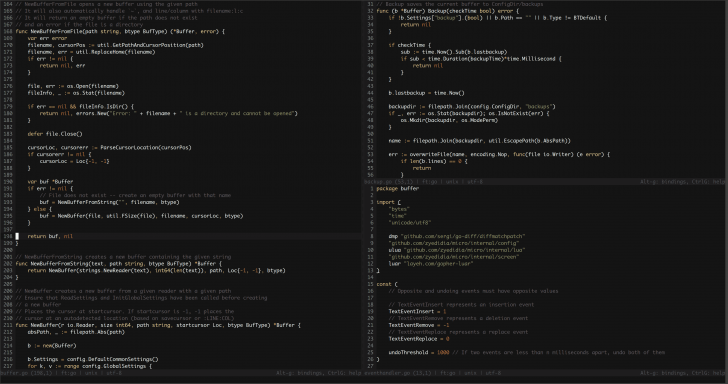
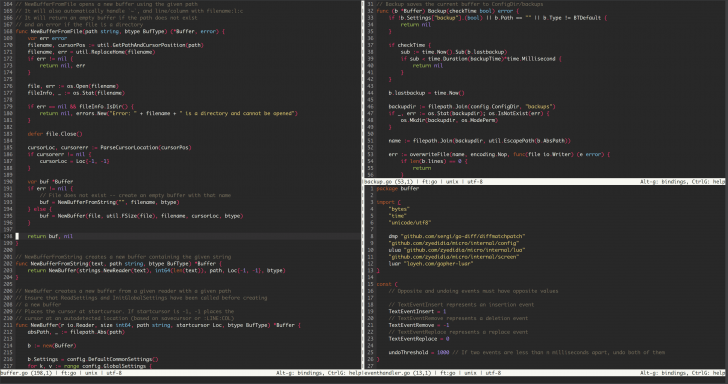
Micro (โปรแกรม Text Editor บน Terminal ใช้งานง่าย พกพาสะดวก) : โปรแกรม Micro เป็นโปรแกรมแก้ไขข้อความ หรือโปรแกรม Text Editor ทำงานบน Terminal ที่เน้นความสมัยใหม่, ใช้งานง่าย และทำงานได้ทันทีโดยไม่ซับซ้อน ตัวโปรแกรมถูกสร้างขึ้นมาเพื่อแก้ปัญหาสำหรับผู้ที่ต้องการพิมพ์ หรือแก้ไขไฟล์ข้อความ และ ส่วนติดต่อผู้ใช้แบบบรรทัดคำสั่ง (CLI) แต่ไม่อยากเผชิญกับความยุ่งยากในการเรียนรู้คำสั่ง หรือปุ่มคีย์ลัดที่ซับซ้อนอย่างโปรแกรมรุ่นเก๋าอย่าง Vim หรือ Emacs เป็นต้น
จุดเด่นหลักของ โปรแกรม Micro คือ ความง่ายตั้งแต่ขั้นตอนการติดตั้ง เพราะมาในรูปแบบไฟล์ไฟล์เดียวแบบ Static Binary ที่ไม่มีความเชื่อมโยง หรือต้องพึ่งพา ไลบรารี (Library) อื่นในเครื่อง ทำให้สามารถดาวน์โหลด และรันได้ทันที รวมถึงเรื่องการใช้งานที่ออกแบบคีย์ลัดตามมาตรฐานคอมพิวเตอร์ยุคปัจจุบัน เช่น การใช้ "ปุ่ม Ctrl+C" เพื่อก๊อปปี้ แล้วกด "ปุ่ม Ctrl+V" เพื่อวาง หรือ "ปุ่ม Ctrl+S" เพื่อบันทึกไฟล์ ทำให้ผู้ใช้งานคอมพิวเตอร์ทั่วไป หรือโปรแกรมเมอร์ไม่ต้องเสียเวลาท่องจำคำสั่งใหม่ นอกจากนี้ ยังรองรับการใช้ เมาส์ (Mouse) อย่างสมบูรณ์แบบ สามารถคลิก, ลากเพื่อไฮไลต์ข้อความ, ดับเบิลคลิกเพื่อเลือกคำ หรือทริปเปิลคลิกเพื่อเลือกทั้งบรรทัดได้อย่างลื่นไหลเหมือนโปรแกรม ส่วนติดต่อผู้ใช้งานแบบกราฟิก (GUI) ทั่วไป
นอกจากความง่ายแล้ว โปรแกรม Micro ยังใส่ฟีเจอร์ระดับสูงสำหรับสายลุยมาอย่างครบครัน เริ่มตั้งแต่ระบบ Multiple Cursors ที่ช่วยให้วางเคอร์เซอร์พร้อมกันหลายจุดเพื่อแก้ไขข้อความหลายบรรทัดได้ในเวลาเดียวกันแบบ Sublime Text, การรองรับการแสดงสีสันไฮไลต์ไวยากรณ์โค้ด (Syntax Highlighting) มากกว่า 75 ภาษา, พร้อมธีมสีมาตรฐานหลายรูปแบบ และรองรับความละเอียดสีทั้ง 16 สี, 256 สี ไปจนถึง Truecolor
สำหรับการปรับแต่ง ตัวโปรแกรม Micro เปิดให้ผู้ใช้ปรับแต่งการตั้งค่า และปุ่มคีย์ลัดได้ง่าย ๆ ผ่าน ไฟล์ JSON หรือหากต้องการฟังก์ชั่นการทำงานที่ลึกกว่านั้น ก็รองรับการเขียนสคริปต์ควบคุมด้วยภาษา Lua รวมถึงมีระบบ ปลั๊กอิน (Plug-in) และ Plugin Manager ในตัวที่ช่วยให้ค้นหา, ดาวน์โหลด และติดตั้ง ส่วนขยาย (Extension) ต่าง ๆ มาใช้งานได้ทันที และที่พิเศษอีกอย่างคือมี Terminal Emulator ในตัว ทำให้ผู้ใช้สามารถแบ่งหน้าจอฝั่งหนึ่งเพื่อพิมพ์โค้ด และอีกฝั่งเพื่อรันคำสั่ง Shell หรือ Bash ไปพร้อม ๆ กันได้โดยไม่ต้องสลับหน้าจอออกไปข้างนอก จึงถือเป็นโปรแกรมแก้ไขข้อความบน Terminal ที่ตอบโจทย์ทั้งมือใหม่ และมือเก๋าที่ต้องการความสะดวก และทรงพลังไปพร้อมกัน
คุณสมบัติ และความสามารถของ โปรแกรม Micro
ติดตั้ง และใช้งานง่าย
มาในรูปแบบ Static Binary ไฟล์เดียวจบ ไม่มี Dependencies อื่นที่ต้องติดตั้งเพิ่ม สามารถดาวน์โหลดแล้วเปิดใช้งานผ่าน Terminal ได้ทันที
ปุ่มคีย์ลัดตามมาตรฐานทั่วไป
รองรับคีย์ลัดมาตรฐานที่คุ้นเคยในระบบปฏิบัติการทั่วไป เช่น Ctrl+C, Ctrl+V, Ctrl+S และ Ctrl+Z ทำให้ใช้งานได้ทันทีโดยไม่ต้องท่องจำคำสั่งใหม่
รองรับการใช้เมาส์อย่างสมบูรณ์
สามารถใช้เมาส์คลิกเพื่อเลื่อนเคอร์เซอร์, ลากเพื่อไฮไลต์ข้อความ, ดับเบิลคลิกเพื่อเลือกคำ และทริปเปิลคลิก เพื่อเลือกข้อความทั้งบรรทัดได้
การจัดการเคอร์เซอร์หลายตำแหน่ง
รองรับฟีเจอร์ Multi-Cursor ในสไตล์ของ Sublime Text ช่วยให้เพิ่มเคอร์เซอร์หลายจุด เพื่อแก้ไขข้อความพร้อมกันหลายบรรทัดได้อย่างรวดเร็ว
ไฮไลต์โค้ด และรองรับสีสันหลากหลาย
- รองรับการแสดงผล Syntax Highlighting สำหรับภาษาโปรแกรมมากกว่า 75 ภาษา
- มีธีมสีมาตรฐานมาให้เลือกใช้ 7 รูปแบบ
- รองรับระบบสีตั้งแต่ 16 สี, 256 สี ไปจนถึง Truecolor
- สามารถสร้างไฟล์ Syntax และธีมสีเพิ่มเองได้ง่าย
ปรับแต่งระบบได้สะดวก
- กำหนดค่าการทำงาน และเปลี่ยนปุ่มคีย์ลัดได้ง่าย ๆ ผ่านไฟล์โครงสร้างแบบ JSON
- รองรับการใช้ภาษา Lua ในการเขียนสคริปต์เพื่อปรับแต่ง และควบคุมฟังก์ชันการทำงานระดับสูง
ระบบปลั๊กอิน
- มีระบบส่วนเสริมในตัวที่เขียนด้วยภาษา Lua พร้อมด้วย Plugin Manager สำหรับค้นหา, ดาวน์โหลด และติดตั้งส่วนเสริมให้อัตโนมัติ
มี Terminal Emulator ในตัว
สามารถเปิดหน้าจอ Terminal ซ้อนภายในโปรแกรม Micro ได้โดยตรง ทำให้แบ่งหน้าจอเพื่อพิมพ์โค้ดฝั่งหนึ่ง และรันคำสั่ง Shell/Bash อีกฝั่งหนึ่งพร้อมกันได้
ระบบความช่วยเหลือในตัว
มีคู่มือคำสั่ง, วิธีการใช้งาน และเอกสารแนะนำติดตั้งอยู่อย่างครบถ้วนภายในตัวโปรแกรม
และความสามารถอื่น ๆ อีกมากมาย
เงื่อนไขการใช้งาน โปรแกรม Micro
โปรแกรม Micro เป็นซอฟต์แวร์ ฟรี (Free) ที่พัฒนาแบบ โอเพ่นซอร์ส (Open-Source) ที่อยู่ภายใต้เงื่อนไขการใช้งานแบบ MIT License ซึ่งหมายความว่าผู้ใช้สามารถใช้งาน, ดัดแปลง, แจกจ่าย และเข้าถึง โค้ดต้นฉบับ (Source Code) ได้อย่างเสรี ภายใต้เงื่อนไขที่กำหนด
หากต้องการค้นหาข้อมูลเพิ่มเติม สามารถติดต่อกับทางผู้พัฒนาโปรแกรมนี้ได้ผ่านทางช่องทางเว็บไซต์ (Website) : https://micro-editor.github.io/index.html (ภาษาอังกฤษ) ได้เลย
คำบรรยายภาษาอังกฤษ (English Descriptions)
Micro is a modern, intuitive, and straightforward terminal-based text editor. It was created to solve the challenge for those who need to edit text files and work within a command-line interface (CLI) without having to deal with the steep learning curve or complex keybindings of veteran editors like Vim or Emacs.
The main highlight of Micro is its simplicity right from the installation process. It comes as a single static binary with no external dependencies or reliance on system libraries, allowing you to download and run it immediately. When it comes to usability, Micro features standard keyboard shortcuts expected from modern computing such as using "Ctrl+C" to copy, "Ctrl+V" to paste, or "Ctrl+S" to save—so general users and programmers don't have to waste time memorizing new commands. Furthermore, it boasts full mouse support, allowing you to click, drag to highlight text, double-click to select words, or triple-click to select entire lines as smoothly as in a traditional graphical user interface (GUI) application.
Beyond its ease of use, Micro comes fully equipped with advanced features for power users. This includes a Multiple Cursors system that lets you place multiple cursors simultaneously to edit across several lines just like in Sublime Text, syntax highlighting support for over 75 programming languages, several default color schemes, and support for 16-color, 256-color, and Truecolor modes.
For customization, Micro allows users to easily configure settings and rebind keys via JSON files. If you need deeper functionality, it supports Lua scripting for extended control. It also includes a built-in plugin system and Plugin Manager, making it easy to search, download, and install extensions right away. Another standout feature is its built-in terminal emulator, which enables you to split the screen typing code on one side while running Shell or Bash commands on the other without ever leaving the editor. Ultimately, Micro is a terminal text editor that caters to both beginners and advanced users who want convenience and power wrapped into one package.
 คำสำคัญ

โปรแกรมที่เกี่ยวข้อง !



ความคิดเห็น ()


ซอฟต์แวร์ไทย
Thai Software
ซอฟต์แวร์ฟรี
Freeware
ซอฟต์แวร์สามัญ
First AID
ซอฟต์แวร์แนะนำ
Recommended
สูงสุดในสัปดาห์
Top Download
สูงสุดตลอดกาล
Hall of Fame
Submit Software
บริการเช็คความเร็วเน็ต (Speedtest) และ เช็คไอพี (Check IP)
 เช็คความเร็วเน็ต
 เช็คไอพี


Thaiware.com is owned and operated by Thaiware Communication Co., Ltd.