
 ซอฟต์แวร์
 แอปพลิเคชันบนมือถือ
 เช็คความเร็วเน็ต (Speedtest)
 เช็คไอพี (Check IP)
 เช็คเลขพัสดุ
 สุ่มออนไลน์
 เครื่องมือคำนวณวันออนไลน์
Matraca (โปรแกรมพิมพ์ตามคำพูดด้วยเสียง รองรับได้ทุกแอป)
ข้อมูลทั่วไป ก่อน ดาวน์โหลดโปรแกรม
 Windows
 macOS
macOS
โปรแกรม Matraca
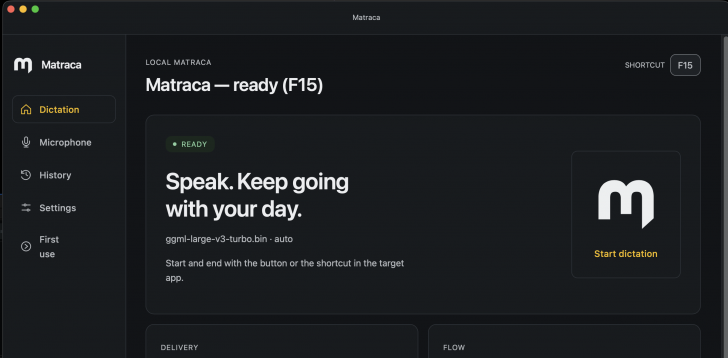
Matraca (โปรแกรมพิมพ์ตามคำพูดด้วยเสียง รองรับได้ทุกแอป) : โปรแกรม Matraca เป็นโปรแกรมแปลงเสียงพูดให้เป็นข้อความ Speech-to-Text หรือ Voice Dictation ที่ออกแบบมาเพื่อให้ผู้ใช้สามารถพิมพ์ข้อความยาว ๆ โน้ต หรือคำสั่ง AI (Prompt) ได้โดยใช้เพียงแค่เสียงพูดโดยไม่ต้องพิมพ์ด้วย คีย์บอร์ด (Keyboard)
จุดเด่นสำคัญของโปรแกรม Matraca คือ ความใส่ใจในเรื่องความเป็นส่วนตัว และความเร็วในการทำงาน โปรแกรมนี้ประมวลผลการแปลงเสียงเป็นข้อความด้วยโมเดล ปัญญาประดิษฐ์ (AI) ที่ชื่อ Whisper บนเครื่องของผู้ใช้โดยตรง (Local Speech Recognition) หมายความว่าไฟล์เสียงพูดจะถูกประมวลผลอยู่ใน หน่วยความจำหลัก (RAM) ของเครื่องเท่านั้น ไม่มีการอัปโหลดไฟล์เสียง หรือส่งข้อมูลเสียงไปยัง เซิร์ฟเวอร์ (Server) ภายนอก และเมื่อดาวน์โหลดโมเดลมาติดตั้งเสร็จสมบูรณ์แล้ว ก็จะสามารถใช้งานโหมดพิมพ์ด้วยเสียงได้ทันทีแม้ไม่ได้เชื่อมต่อ อินเทอร์เน็ต (Internet)
ในด้านการทำงานโปรแกรม Matraca จะฝังตัวอยู่บริเวณ System Tray ของ ระบบปฏิบัติการ (OS) เพื่อรอรับคำสั่ง เมื่อผู้ใช้ต้องการพิมพ์ข้อความ เพียงแค่เลื่อนเคอร์เซอร์ไปวางไว้ ณ จุดที่ต้องการพิมพ์ ไม่ว่าจะเป็นโปรแกรมแก้ไขข้อความ (Text Editor), เว็บเบราว์เซอร์ (Web Browser), แอปพลิเคชันแชท หรือหน้าต่าง เทอร์มินัล (Terminal) แล้วกดปุ่มคีย์ลัด (Shortcut) ที่ตั้งค่าไว้ จากนั้นโปรแกรมจะเริ่มอัดเสียง และเปลี่ยนคำพูดเป็นข้อความแล้วพิมพ์ลงในช่องนั้นทันทีโดยอัตโนมัติ นอกจากนี้ยังรองรับการบันทึกประวัติข้อความย้อนหลังไว้ภายในเครื่อง เผื่อกรณีที่การพิมพ์ลงในบางโปรแกรมขัดข้อง ผู้ใช้ก็ยังสามารถก๊อปปี้ข้อความย้อนหลังมาใช้งานได้
นอกเหนือจากการแปลงเสียงเป็นข้อความขั้นพื้นฐานแล้ว โปรแกรม Matraca ยังมีตัวเลือกเสริมสำหรับเชื่อมต่อไปยังบริการ AI ภายนอกผ่าน ส่วนต่อประสานโปรแกรมประยุกต์ (API) API Key เพื่อช่วยขัดเกลา หรือรีวิวข้อความ (AI Text Review) ได้อีกด้วย แต่ฟังก์ชันนี้จะถูกปิดไว้เป็นค่าเริ่มต้นเพื่อความปลอดภัย หากต้องการเปิดใช้งานจึงจะมีการส่งข้อความตัวอักษรไปยังผู้ให้บริการ AI นั้น ๆ
คุณสมบัติ และความสามารถของ โปรแกรม Matraca
ระบบแปลงเสียงเป็นข้อความแบบประมวลผลในเครื่อง
- ใช้เทคโนโลยีโมเดล AI Whisper ในการแปลงเสียงพูดเป็นข้อความบนเครื่องคอมพิวเตอร์ของผู้ใช้โดยตรง
- เมื่อดาวน์โหลดโมเดลมาลงเครื่องเรียบร้อยแล้ว สามารถใช้งานโหมดแปลงเสียงเป็นข้อความได้แบบ Offline โดยไม่ต้องต่ออินเทอร์เน็ต
เน้นความเป็นส่วนตัวสูง
- ไม่มีระบบการเก็บข้อมูลการใช้งาน (Telemetry) และไม่ต้องสมัครหรือลงชื่อเข้าใช้บัญชีใด ๆ
- เสียงที่อัดจะถูกประมวลผลอยู่ในหน่วยความจำ (RAM) เท่านั้น ไม่มีทางถูกส่งขึ้น คลาวด์ (Cloud) หรือบันทึกเป็นไฟล์เสียงลงดิสก์
ผสานการทำงานกับทุกโปรแกรม
- ทำงานเบื้องหลังอยู่บน System Tray พร้อมใช้งานตลอดเวลา
- สามารถพิมพ์ข้อความลงในช่องพิมพ์ของแอปพลิเคชันใดก็ได้โดยตรง เพียงวางเคอร์เซอร์ไว้ แล้วกดปุ่มคีย์ลัด (Shortcut Key) ที่ตั้งค่าไว้เพื่อเริ่มพูด
ระบบบันทึกประวัติภายในเครื่อง
- บันทึกข้อความที่เคยแปลงจากเสียงเก็บไว้ในเครื่อง เผื่อกรณีที่ระบบพิมพ์ลงโปรแกรมเป้าหมายไม่สำเร็จ ผู้ใช้ยังสามารถย้อนกลับมาคัดลอกข้อความไปใช้งานได้
ฟังก์ชันขัดเกลาข้อความด้วย AI
- มี ส่วนขยาย (Extension) ในการเชื่อมต่อ API กับบริการ AI ภายนอก เพื่อช่วยตรวจทาน, ปรับสำนวน หรือขัดเกลาข้อความที่แปลงออกมา
- ฟังก์ชันนี้จะถูกปิดไว้เป็นค่าเริ่มต้น (Off by default) และจะส่งไปเฉพาะตัวข้อความเท่านั้น ไม่ส่งไฟล์เสียง
การเปิดให้ใช้งาน
รองรับการใช้งานบนระบบปฏิบัติการ วินโดวส์ (Windows) และ แมคโอเอส (macOS)
และความสามารถอื่น ๆ อีกมากมาย
เงื่อนไขการใช้งาน โปรแกรม Matraca
โปรแกรม Matraca เป็นซอฟต์แวร์ ฟรี (Free) ที่พัฒนาแบบ โอเพ่นซอร์ส (Open-Source) ที่อยู่ภายใต้เงื่อนไขการใช้งานแบบ MIT License ซึ่งหมายความว่าผู้ใช้สามารถใช้งาน, ดัดแปลง, แจกจ่าย และเข้าถึง โค้ดต้นฉบับ (Source Code) ได้อย่างเสรี ภายใต้เงื่อนไขที่กำหนด
หากต้องการค้นหาข้อมูลเพิ่มเติม สามารถติดต่อกับทางผู้พัฒนาโปรแกรมนี้ได้ผ่านทางช่องทางเว็บไซต์ (Website) : https://fabriciocasali.github.io/matraca/ (ภาษาอังกฤษ) ได้เลย
คำบรรยายภาษาอังกฤษ (English Descriptions)
Matraca is a Speech-to-Text or Voice Dictation program designed to let users type long messages, notes, or AI prompts using only their voice, eliminating the need to type on a keyboard.
The defining strengths of Matraca are its strong focus on privacy and operational speed. It processes voice-to-text conversion directly on the user's computer using an AI model named Whisper through Local Speech Recognition. This means voice audio files are processed strictly within the system's primary memory (RAM), with zero audio uploads or transmissions to external servers. Once the model is fully downloaded and installed, the voice dictation mode can be used immediately, even without an active internet connection.
In terms of operation, Matraca sits quietly in the operating system's System Tray, waiting for commands. When users want to type a message, they simply place their cursor in the desired target field—whether in a text editor, web browser, chat application, or terminal window—and press a user-defined keyboard shortcut. The program then begins recording, converts the spoken words into text, and automatically types it directly into that field. Furthermore, it supports local message history tracking, allowing users to easily copy past transcriptions should automatic text insertion fail in a specific application.
Beyond basic speech-to-text conversion, Matraca offers an optional feature to connect to external AI services using an API key for AI Text Review to refine or polish transcribed content. This feature is disabled by default for security, and only text data is sent to the designated AI provider if activated.
 คำสำคัญ

โปรแกรมที่เกี่ยวข้อง !



ความคิดเห็น ()


ซอฟต์แวร์ไทย
Thai Software
ซอฟต์แวร์ฟรี
Freeware
ซอฟต์แวร์สามัญ
First AID
ซอฟต์แวร์แนะนำ
Recommended
สูงสุดในสัปดาห์
Top Download
สูงสุดตลอดกาล
Hall of Fame
Submit Software
บริการเช็คความเร็วเน็ต (Speedtest) และ เช็คไอพี (Check IP)
 เช็คความเร็วเน็ต
 เช็คไอพี


Thaiware.com is owned and operated by Thaiware Communication Co., Ltd.