
 ซอฟต์แวร์
 แอปพลิเคชันบนมือถือ
 เช็คความเร็วเน็ต (Speedtest)
 เช็คไอพี (Check IP)
 เช็คเลขพัสดุ
 สุ่มออนไลน์
 เครื่องมือคำนวณวันออนไลน์
termtrace (โปรแกรมบันทึก และตรวจสอบการทำงานบน Terminal สำหรับนักพัฒนา)

ข้อมูลทั่วไป ก่อน ดาวน์โหลดโปรแกรม
 Windows
 macOS
macOS Linux / FreeBSD
โปรแกรม termtrace
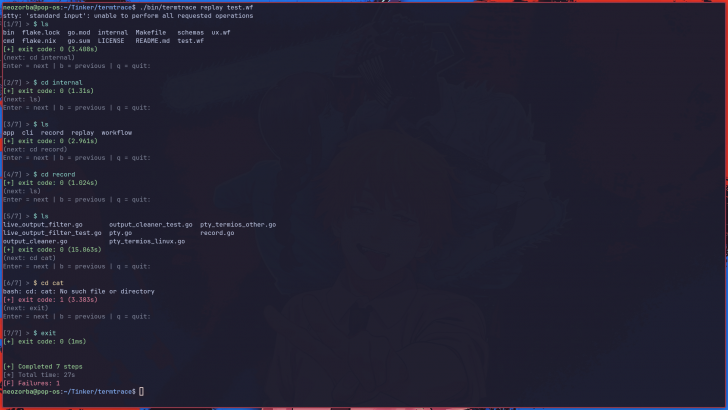
termtrace (โปรแกรมบันทึก และตรวจสอบการทำงานบน Terminal สำหรับนักพัฒนา) : โปรแกรม termtrace เป็นโปรแกรมสำหรับบันทึกการทำงานบน ส่วนติดต่อผู้ใช้แบบบรรทัดคำสั่ง (CLI) ที่ถูกออกแบบมาเพื่อเปลี่ยนกระบวนการแก้ไขปัญหา หรือการทำงานต่าง ๆ ให้กลายเป็นไฟล์ที่สามารถนำกลับมาเล่นซ้ำ และแบ่งปันให้ผู้อื่นได้อย่างแม่นยำ
ตัวโปรแกรมจะทำงานในรูปแบบการจำลองเทอร์มินัล (Pseudo-Terminal หรือ PTY) เพื่อบันทึกคำสั่งที่ผู้ใช้พิมพ์, ผลลัพธ์ที่แสดงบนหน้าจอ ลำดับการทำงาน, ระยะเวลาที่ใช้ในแต่ละคำสั่ง ไปจนถึงรหัสสถานะการทำงาน (Exit Codes) อย่างละเอียด ซึ่งจะอุดช่องโหว่ของการดูประวัติคำสั่ง (Shell history) ที่มักจะเก็บแค่ตัวคำสั่งแต่ทำผลลัพธ์สูญหาย และแก้ปัญหาของการบันทึกหน้าจอแบบวิดีโอที่ผู้ใช้ไม่สามารถคัดลอกข้อความออกมาได้ ข้อมูลการบันทึกทั้งหมดจะถูกจัดเก็บในรูปแบบไฟล์ .wf ซึ่งมีโครงสร้างข้อมูลแบบ JSON ทำให้ระบบสามารถอ่าน และประมวลผลได้อย่างมีแบบแผนตายตัว
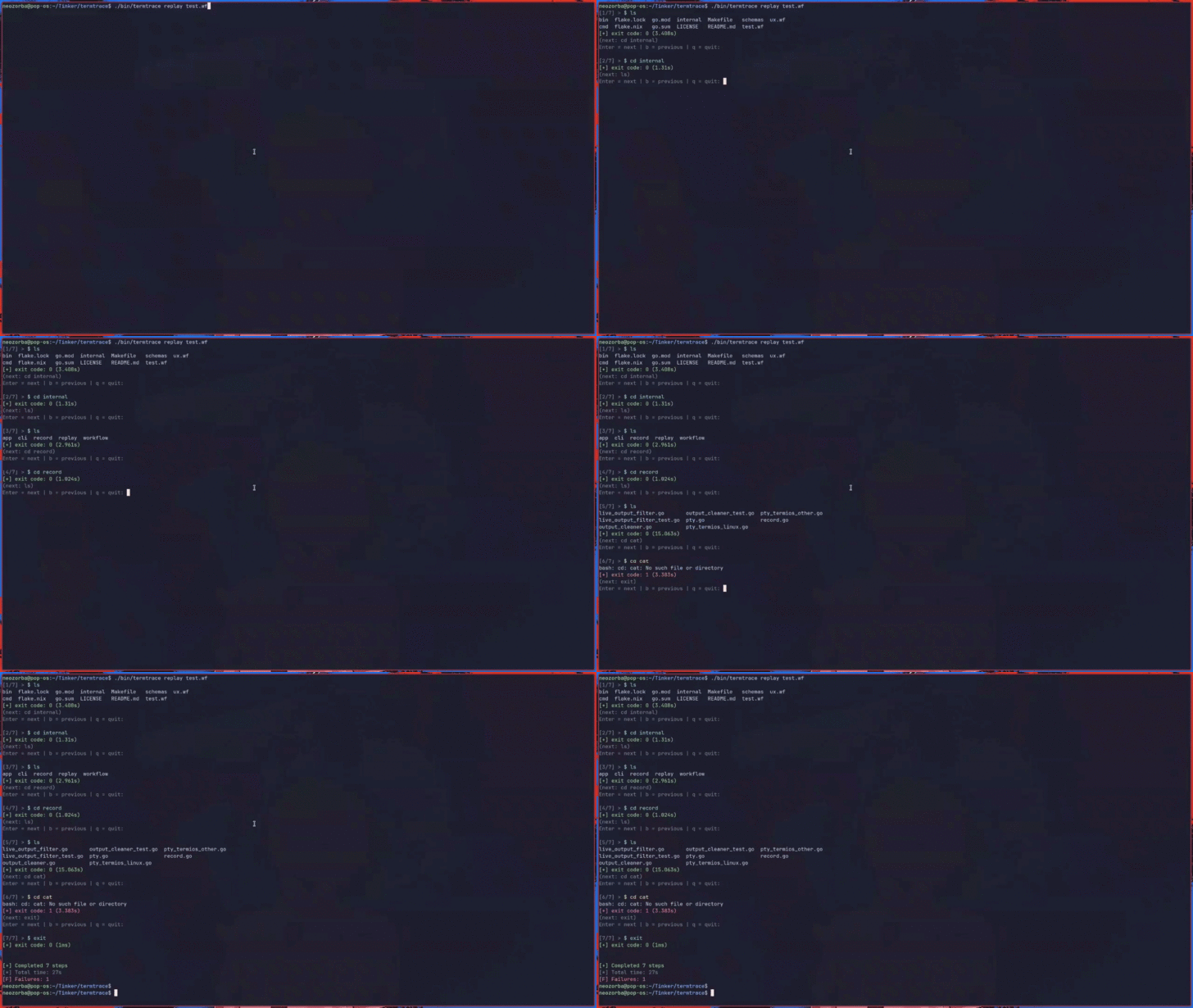
เมื่อทำการบันทึกเสร็จสิ้นแล้ว ผู้ใช้งานสามารถใช้คำสั่งเพื่อเปิดดูการทำงานย้อนหลังได้แบบทีละขั้นตอน โดยสามารถควบคุมให้เดินหน้า, ถอยหลัง หรือเล่นอัตโนมัติ เพื่อตรวจสอบคำสั่ง, ผลลัพธ์ และจุดที่เกิดข้อผิดพลาดได้เสมือนอยู่ในเหตุการณ์จริง นอกจากนี้ยังมีระบบสำหรับการแบ่งปันไฟล์ที่สามารถคัดกรอง หรือลบข้อมูลที่ละเอียดอ่อน (Redaction) เช่น รหัสผ่าน, ข้อมูลส่วนบุคคล หรือกุญแจความปลอดภัยต่าง ๆ ออกจากไฟล์บันทึกอัตโนมัติก่อนส่งต่อ รวมถึงสามารถตัดทอนผลลัพธ์บนหน้าจอที่ยาวเกินไปได้ ทำให้โปรแกรมนี้มีประโยชน์อย่างมากในการส่งต่อข้อมูลให้เพื่อนร่วมทีมช่วยแก้ไขบั๊กยาก ๆ การทำเอกสารวิเคราะห์สาเหตุของปัญหา (RCA) หรือแม้แต่การส่งไฟล์ให้พนักงานใหม่ดูขั้นตอนการตั้งค่าระบบ โดยไม่ต้องอาศัยการจดจำ หรือการคาดเดาสถานการณ์ที่เกิดขึ้นเลย
คุณสมบัติ และความสามารถของ โปรแกรม termtrace
การบันทึก (Recording)
- บันทึกเซสชันของเทอร์มินัลภายใต้สภาพแวดล้อมเชลล์จริง (ใช้ PTY)
- จับข้อมูลทั้งคำสั่ง (Commands), ผลลัพธ์ (Outputs) และลำดับการทำงาน (Execution flow) ทั้งหมดอย่างครบถ้วน
- จัดเก็บข้อมูลแต่ละขั้นตอนพร้อมระบุเวลาที่เกิดเหตุการณ์ (Timestamp) และระยะเวลาการทำงาน (Duration)
- มีการติดตามรหัสสถานะ (Exit Codes) ของทุกคำสั่งที่รันเพื่อเช็คสถานะความสำเร็จ หรือข้อผิดพลาด
การเปิดเล่นซ้ำ (Replay)
- สามารถเล่นซ้ำเซสชันที่บันทึกไว้ได้แบบทีละขั้นตอน (Step-by-step)
- แสดงคำสั่ง, ผลลัพธ์บนหน้าจอ และข้อผิดพลาดตรงตามความเป็นจริงที่เกิดขึ้นในตอนที่บันทึก
- ควบคุมการเล่นได้ตามต้องการ เช่น
- เลื่อนไปดูคำสั่งถัดไป
- ย้อนกลับ
- สั่งให้รันโชว์แบบอัตโนมัติ
- มีการทำไฮไลต์ข้อผิดพลาด และคำสั่งที่มีรหัสสถานะไม่เป็นศูนย์ (Non-Zero Exits) เพื่อให้สังเกตเห็นบั๊กได้ง่ายขึ้น
การแชร์ข้อมูล (Share)
- สามารถแปลงเป็นไฟล์นามสกุล .wf ฉบับที่ทำความสะอาดข้อมูลแล้ว เพื่อให้แชร์ได้อย่างปลอดภัย
- มีระบบปกปิด หรือเซ็นเซอร์ข้อมูลละเอียดอ่อน (Redaction) ให้อัตโนมัติ
- รองรับการสร้างกฎเพื่อเซ็นเซอร์ข้อมูลเฉพาะจุดด้วยตัวเองได้ผ่านการตั้งค่า Pattern
- สามารถตัดทอน (Trim) ผลลัพธ์ stdout / stderr ที่ยาว หรือรกเกินไปในแต่ละขั้นตอนได้
โครงสร้างไฟล์ และการติดตาม (Trace)
- จัดเก็บข้อมูลเซสชันในรูปแบบไฟล์ .wf ซึ่งมีโครงสร้างแบบ JSON (ไฟล์รูปแบบมาตรฐาน)
- ข้อมูลมีความเป็นระบบ โปรแกรม หรือเครื่องจักรสามารถอ่าน และนำไปประมวลผลต่อได้ (Machine-Readable และ Deterministic)
- ข้อมูลที่ถูกเก็บไว้ประกอบด้วยรายละเอียดสำคัญ ได้แก่
- คำสั่ง
- ผลลัพธ์ (stdout / stderr)
- Exit Code
- Timestamp
- Duration
และความสามารถอื่น ๆ อีกมากมาย
เงื่อนไขการใช้งาน โปรแกรม termtrace
โปรแกรม termtrace เป็นซอฟต์แวร์ ฟรี (Free) ที่พัฒนาแบบ โอเพ่นซอร์ส (Open-Source) ที่อยู่ภายใต้เงื่อนไขการใช้งานแบบ MIT License ซึ่งหมายความว่าผู้ใช้สามารถใช้งาน, ดัดแปลง, แจกจ่าย และเข้าถึง โค้ดต้นฉบับ (Source Code) ได้อย่างเสรี ภายใต้เงื่อนไขที่กำหนด
หากต้องการค้นหาข้อมูลเพิ่มเติม สามารถติดต่อกับทางผู้พัฒนาโปรแกรมนี้ได้ผ่านทางช่องทางเว็บไซต์ (Website) : https://github.com/AmalChandru/termtrace (ภาษาอังกฤษ) ได้เลย
คำบรรยายภาษาอังกฤษ (English Descriptions)
termtrace is a command-line interface (CLI) workflow recorder designed to transform troubleshooting sessions or general tasks into replayable, shareable artifacts. Operating through a pseudo-terminal (PTY), the program meticulously captures user-typed commands, on-screen outputs, execution sequences, time duration per command, and exit codes. This approach bridges the gap between shell history which often logs commands but loses the output and video screen recordings, where users cannot easily copy or interact with the text. All recorded data is stored in a .wf file with a structured JSON format, ensuring the information is deterministic and machine-readable.
Once recording is complete, users can review the session step-by-step, with full control to navigate forward, backward, or play automatically. This allows for the inspection of commands, outputs, and failure points as if being present during the live session. Furthermore, the tool includes a sharing system capable of automatically redacting sensitive information—such as passwords, personal data, or security keys—before the file is distributed. It also allows for the trimming of excessively long outputs. These features make termtrace an invaluable asset for collaborating with teammates on complex bugs, creating Root Cause Analysis (RCA) documentation, or providing onboarding materials for new employees, eliminating the need for memory or guesswork.
 คำสำคัญ

โปรแกรมที่เกี่ยวข้อง !




ความคิดเห็น ()


ซอฟต์แวร์ไทย
Thai Software
ซอฟต์แวร์ฟรี
Freeware
ซอฟต์แวร์สามัญ
First AID
ซอฟต์แวร์แนะนำ
Recommended
สูงสุดในสัปดาห์
Top Download
สูงสุดตลอดกาล
Hall of Fame
Submit Software
บริการเช็คความเร็วเน็ต (Speedtest) และ เช็คไอพี (Check IP)
 เช็คความเร็วเน็ต
 เช็คไอพี


Thaiware.com is owned and operated by Thaiware Communication Co., Ltd.