
 ซอฟต์แวร์
 แอปพลิเคชันบนมือถือ
 เช็คความเร็วเน็ต (Speedtest)
 เช็คไอพี (Check IP)
 เช็คเลขพัสดุ
 สุ่มออนไลน์
 เครื่องมือคำนวณวันออนไลน์
WordCraft (โปรแกรมพิมพ์งาน เอกสาร สำหรับใช้แทน MS Word)
ข้อมูลทั่วไป ก่อน ดาวน์โหลดโปรแกรม
 Windows
 macOS
macOS Linux / FreeBSD
 Web Application
โปรแกรม WordCraft
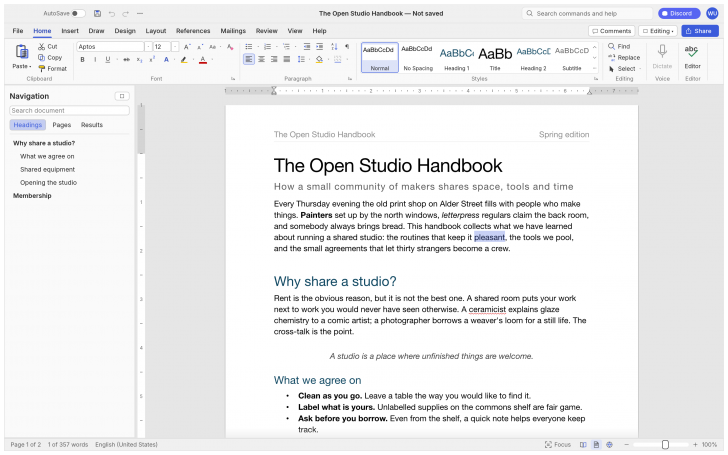
WordCraft (โปรแกรมพิมพ์งาน เอกสาร สำหรับใช้แทน MS Word) : โปรแกรม WordCraft เป็นโปรแกรมประมวลผลคำ (Word Processor) หรือโปรแกรมพิมพ์งาน และจัดการเอกสาร ที่ถูกพัฒนาขึ้นมาเพื่อใช้ทดแทน โปรแกรม Microsoft Word โดยทีมผู้พัฒนาชื่อ ArtCraft
ตัวโปรแกรม WordCraft สร้างขึ้นด้วย ภาษา Rust ทั้งหมดในรูปแบบ Clean-Room Reimplementation ซึ่งหมายถึงการเขียนโค้ดขึ้นมาใหม่ทั้งหมดตั้งแต่ต้นโดยอาศัยข้อกำหนดมาตรฐานสาธารณะ และการสังเกตการทำงาน ไม่ได้มีการคัดลอกโค้ดเดิมของโปรแกรม Microsoft Word มาเลยแม้แต่น้อย
จุดเด่นสำคัญคือ การถอดแบบเวิร์กโฟลว์, หน้าตา ส่วนติดต่อผู้ใช้งานแบบกราฟิก (GUI) และ ประสบการณ์ของผู้ใช้งาน (UX) มาจาก Microsoft Word ที่ทุกคนคุ้นเคย ไม่ว่าจะเป็นเมนูแถบเครื่องมือแบบ Ribbon, ระบบ Style, การสร้างตาราง, ระบบติดตามการแก้ไข (Track Changes), การอ้างอิง และเชิงอรรถ (References) ไปจนถึงการจดหมายเวียน (Mail Merge) ทำให้ผู้ใช้สามารถย้ายมาใช้งานได้ทันทีโดยไม่ต้องเรียนรู้ใหม่
ด้านการทำงานกับไฟล์ โปรแกรมรองรับการอ่านและบันทึกไฟล์นามบัตรหลักอย่าง .docx (OOXML) ได้อย่างสมบูรณ์แบบ รวมถึงการเปิดไฟล์ Word รุ่นเก่า (.doc) และนำเข้า / ส่งออกไฟล์ประเภทอื่น ๆ เช่น .odt, .rtf, .html, .md (Markdown), .tex (LaTeX), .txt ตลอดจนการส่งออกเอกสารเป็นไฟล์ PDF ที่มีข้อความจริง ลิงก์ และบุ๊กมาร์กครบถ้วน
ความเร็ว และประสิทธิภาพถือเป็นอีกหนึ่งไฮไลต์หลัก เนื่องจากพัฒนาด้วยภาษา Rust และทำงานผ่าน กราฟิกการ์ด (GPU) โดยตรงโดยใช้ ไลบรารี (Library) ของ egui จึงไม่มีปัญหาความอืดจาก เฟรมเวิร์ก (Framework) ประเภท Electron หรือ Tauri ระบบประมวลผลจัดหน้าบรรทัดมีการทำแคช (Cache) ทำให้เอกสารขนาดใหญ่กว่าร้อยหน้ายังสามารถพิมพ์ และจัดหน้าใหม่ได้อย่างรวดเร็วในเวลาเพียงไม่กี่มิลลิวินาที
นอกจากนี้ โปรแกรมยังถูกออกแบบมาให้รองรับการสั่งงานด้วย ปัญญาประดิษฐ์ (AI) Agents ผ่าน โปรโตคอล (Protocol) Model Context Protocol (MCP) และ ส่วนติดต่อผู้ใช้แบบบรรทัดคำสั่ง (CLI) ช่วยให้ AI สามารถสร้าง, จัดการ หรือแก้ไขเอกสารได้โดยตรง และในแง่ความเป็นส่วนตัว ตัวโปรแกรมทำงานแบบออฟไลน์ 100% ไม่ส่งข้อมูลเอกสาร, การตรวจคำผิด หรือไวยากรณ์ออกไปยัง เซิฟเวอร์ (Server) ภายนอก
ด้านการรองรับแพลตฟอร์ม โปรแกรม WordCraft สามารถทำงานแบบ Native ได้ข้ามแพลตฟอร์ม ทั้งบน ระบบปฏิบัติการ (OS) แมคโอเอส (macOS), วินโดวส์ (Windows), ลีนุกซ์ (Linux), Berkeley Software Distribution (BSD) และยังสามารถเปิดใช้งานผ่าน เว็บเบราว์เซอร์ (Web Browser) ได้โดยตรงด้วยเทคโนโลยี WebAssembly โดยแจกจ่ายให้ใช้งานฟรี
คุณสมบัติ และความสามารถของ โปรแกรม WordCraft
สถาปัตยกรรม และประสิทธิภาพ
- เขียนโค้ดใหม่ทั้งหมดด้วยภาษา Rust ไม่ได้ดัดแปลง หรือใช้โค้ดเดิมของ Microsoft Word
- ความเร็วสูง ประมวลผลเอกสารขนาดใหญ่ ด้วยระบบ Caching
- รันบน GPU โดยตรง ไม่ได้ใช้เฟรมเวิร์กที่กินทรัพยากรสูงอย่าง Electron หรือ Tauri
- รองรับการใช้งานบน macOS, Windows, Linux, BSD และเล่นผ่านเว็บเบราว์เซอร์ได้ด้วย WebAssembly (Wasm)
- ทำงานแบบออฟไลน์ทั้งหมด ไม่มีการส่งข้อมูลเอกสาร, การตรวจคำผิด หรือไวยากรณ์ออกไปยังเซิร์ฟเวอร์ภายนอก
อินเทอร์เฟซ และการใช้งาน
- เวิร์กโฟลว์แบบ MS Word มีเมนูแถบเครื่องมือแบบ Ribbon, Live Styles gallery, ไม้บรรทัด และ Navigation Pane
- ปรับเปลี่ยนธีมเป็นโหมดมืดได้เต็มรูปแบบ พร้อมตัวเลือกแสดงเครื่องหมายจัดหน้า
- การแสดงผลหลากหลาย รองรับมุมมอง Print layout, Web layout, Draft, Read mode, Focus mode และปรับ Zoom ได้ตามต้องการ
- ใช้คีย์ลัดมาตรฐานเดิมทั้งหมด เช่น Ctrl/⌘+B (ตัวหนา), F4 (ทำซ้ำคำสั่งเดิม), F7 (ตรวจคำผิด), F8 (ขยายการเลือก)
- รองรับหลายภาษา มีเมนูภาษาอังกฤษ, จีน (ตัวย่อ/ตัวเต็ม), ญี่ปุ่น, โปรตุเกส, สเปน และยูเครน
การจัดการเอกสาร และไฟล์
- อ่านและบันทึกไฟล์ .docx (OOXML) ได้อย่างสมบูรณ์ และนำเข้าไฟล์ Word รุ่นเก่า .doc ได้
- นำเข้า และส่งออกได้หลากหลาย รองรับไฟล์ .odt, .rtf, .html, .md (Markdown), .tex (LaTeX) และ .txt
- ส่งออกเป็น ไฟล์ PDF ที่มีคุณภาพสูงที่มีข้อความจริง, ลิงก์ และ Bookmark ถ่ายทอดไปอย่างถูกต้อง
ฟังก์ชันการแก้ไข และจัดหน้า
- การพิมพ์ และแก้ไขข้อความ รองรับ IME, Smart quotes, AutoCorrect, จัดรูปแบบรายการอัตโนมัติ และ Find & Replace ด้วย Regex
- การจัดข้อความ และรูปแบบ รองรับการปรับเปลี่ยน ฟอนต์ (Font), ระยะห่างตัวอักษร/บรรทัด, Drop Caps, ตัวย่อ/ขยาย, ตารางพร้อมสูตรคำนวณ และการซ่อน/ตัดบรรทัด
องค์ประกอบหน้าเอกสาร: ปรับระยะขอบ, การวางแนว, ขนาดกระดาษ, แบ่งคอลัมน์, ใส่ Header/Footer, เลขหน้า, Watermark และใส่เส้นขอบหน้า
การจัดการรูปภาพและวัตถุ: แทรกและตัดรูปภาพ (Crop), หมุนภาพ, ปรับความสว่าง/ความเข้ม, ลบพื้นหลัง, ใส่รูปทรง, ข้อความข้อความ (Text box) และจัดข้อความล้อมรอบวัตถุ (Text wrapping)
เครื่องมืออ้างอิง และงานเอกสารระดับสูง
- รองรับระบบอ้างอิง,สารบัญอัตโนมัติ, เชิงอรรถ, อ้างอิงตามมาตรฐาน APA, MLA, Chicago, IEEE, ดรรชนี และคำบรรยายภาพ
- ระบบติดตามการเปลี่ยนแปลง, ใส่กล่องข้อความความคิดเห็น, ตรวจคำผิด และไวยากรณ์พร้อมคำแนะนำ, พจนานุกรมคำพ้อง และเปรียบเทียบเอกสาร
- จดหมายเวียน รองรับ Mail merge นำเข้าข้อมูลจาก ไฟล์ CSV, จดหมายเวียน, ซองจดหมาย และป้ายสัญลักษณ์
การรองรับ AI และระบบอัตโนมัติ
- ออกแบบมาให้ AI ควบคุมผ่าน Model Context Protocol (MCP) หรือ CLI ได้โดยตรง
- ทุกฟังก์ชันการทำงานมี Command ID รองรับคำสั่ง 422 คำสั่งผ่าน Ribbon, คีย์ลัด, Search, CLI และ JSON Control Channel
- บันทึกชุดคำสั่งเพื่อนำกลับมารันซ้ำโดยอัตโนมัติได้
และความสามารถอื่น ๆ อีกมากมาย
เงื่อนไขการใช้งาน โปรแกรม WordCraft
โปรแกรม WordCraft เป็นซอฟต์แวร์ ฟรี (Free) ที่พัฒนาแบบ โอเพ่นซอร์ส (Open-Source) ที่อยู่ภายใต้เงื่อนไขการใช้งานแบบ Apache-2.0, MIT Licenses ซึ่งหมายความว่าผู้ใช้สามารถใช้งาน, ดัดแปลง, แจกจ่าย และเข้าถึง โค้ดต้นฉบับ (Source Code) ได้อย่างเสรี ภายใต้เงื่อนไขที่กำหนด
หากต้องการค้นหาข้อมูลเพิ่มเติม สามารถติดต่อกับทางผู้พัฒนาโปรแกรมนี้ได้ผ่านทางช่องทางเว็บไซต์ (Website) : https://getartcraft.com/apps/wordcraft (ภาษาอังกฤษ) ได้เลย
คำบรรยายภาษาอังกฤษ (English Descriptions)
WordCraft is a word processor and document management software developed by the ArtCraft team to serve as an alternative to Microsoft Word. Built entirely in pure Rust using a clean-room reimplementation approach, the program was written from scratch based on public open specifications and observed behavior, without copying a single line of original code from Microsoft Word.
Its primary highlight is how faithfully it reproduces the workflow, graphical user interface (GUI), and user experience (UX) of Microsoft Word, featuring the familiar ribbon menu, styles system, table creation, track changes, references and footnotes, and mail merge, allowing users to transition seamlessly without a learning curve.
In terms of file compatibility, WordCraft provides full read and write support for standard .docx (OOXML) files, opens legacy Word (.doc) files, and handles imports and exports for formats including .odt, .rtf, .html, .md (Markdown), .tex (LaTeX), and .txt, as well as exporting to PDF with native selectable text, links, and bookmarks.
Speed and performance serve as another key highlight, as the application leverages Rust and renders directly on the GPU via the egui library, avoiding the performance overhead typical of frameworks like Electron or Tauri. Paragraph layouts are cached, enabling documents over a hundred pages long to be edited and re-laid out in just milliseconds.
Furthermore, WordCraft is designed to interface with AI agents through the Model Context Protocol (MCP) and a command-line interface (CLI), allowing AI to generate, manage, or edit documents directly. From a privacy perspective, the software operates 100% offline, ensuring that document content, spell checks, and grammar queries are never sent to external servers.
On platform support, WordCraft runs natively across macOS, Windows, Linux, and BSD, and can also run inside web browsers through WebAssembly technology, distributed completely free of charge.
 คำสำคัญ

โปรแกรมที่เกี่ยวข้อง !



ความคิดเห็น ()


ซอฟต์แวร์ไทย
Thai Software
ซอฟต์แวร์ฟรี
Freeware
ซอฟต์แวร์สามัญ
First AID
ซอฟต์แวร์แนะนำ
Recommended
สูงสุดในสัปดาห์
Top Download
สูงสุดตลอดกาล
Hall of Fame
Submit Software
บริการเช็คความเร็วเน็ต (Speedtest) และ เช็คไอพี (Check IP)
 เช็คความเร็วเน็ต
 เช็คไอพี


Thaiware.com is owned and operated by Thaiware Communication Co., Ltd.