
 ซอฟต์แวร์
 แอปพลิเคชันบนมือถือ
 เช็คความเร็วเน็ต (Speedtest)
 เช็คไอพี (Check IP)
 เช็คเลขพัสดุ
 สุ่มออนไลน์
 เครื่องมือคำนวณวันออนไลน์
FocusWriter (โปรแกรม FocusWriter พิมพ์เอกสาร ฟรี)

ข้อมูลทั่วไป ก่อน ดาวน์โหลดโปรแกรม
 Windows
 macOS
macOS Linux / FreeBSD
FocusWriter Download
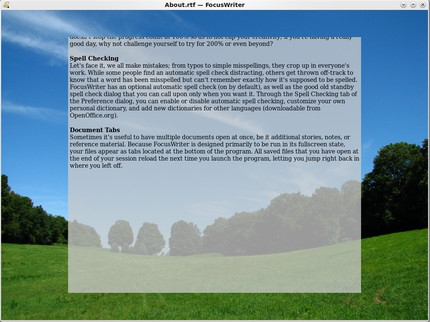
FocusWriter (โปรแกรม FocusWriter พิมพ์เอกสาร เหมือน Word ฟรี) : สำหรับ โปรแกรม FocusWriter ตัวนี้ เป็น โปรแกรมเอกสาร คือเอาไว้ใช้ พิมพ์เอกสาร เหมือน โปรแกรม Word เป็นโปรเจคที่คิดค้นพัฒนาขึ้นมาตั้งแต่ปี ค.ศ. 2008 แต่ก่อนยังไม่ได้รับความนิยมเท่าที่ควร แต่เดี๋ยวนี้ เป็นที่นิยมอย่างมากละ โปรแกรมนี้เป็นโปรแกรมเอกสาร หรือ ที่เราเรียกว่า Word Processor นั่นเอง
ซึ่งถ้าพูดถึงจุดเด่นพิเศษที่ถือได้ว่าเป็นตัวชูโรงของโปรแกรมเอกสาร FocusWrite ตัวนี้เลยก็คือ โปรแกรมนี้ทำให้คุณสามารถพิมพ์เอกสาร หรือจัดการเอกสารได้โดยปราศจากการรบกวนจากภายนอก นั่นหมายความว่า ระหว่างการพิมพ์เอกสาร จะไม่มีสิ่งรบกวนอย่าง โปรแกรมอื่นๆ สมชื่อของโปรแกรมนี้คือ FocusWriter ให้คุณโฟกัสหรือใจจดจ่ออยู่แต่กับการพิมพ์เอกสารเท่านั้น
เพราะโปรแกรม โปรแกรม FocusWriter นี้ระหว่างการพิมพ์เอกสาร จะไม่มีเมนู หรืออะไรอย่างอื่นเข้ามารบกวนเลย และที่สำคัญการเข้าถึง เมนู (Menu) ของโปรแกรมตัวนี้ก็สามารถทำได้โดยการเลื่อนเมาส์ไปไว้ที่ขอบด้านบน ล่าง ขวา แบบนี้เมนูก็จะถูกเลื่อนลงมาให้ปรับแต่งเอกสาร กันได้อย่างง่ายดาย
นอกจากนี้แล้ว โปรแกรม FocusWriter ยังสามารถที่จะเปลี่ยนรูปแบบการแสดงผล (Theme) อาทิเช่น เปลี่ยน รูปแบบตัวอักษร (Font) สี รวมไปถึงพื้นหลัง (Background) ของโปรแกรมนี้ได้อีกด้วยละครับ โปรแกรม FocusWriter โปรแกรมนี้มาพร้อมกับความสามารถพิเศษอื่นๆ แปลกๆ อีกมากมาย ลองดูด้านล่างได้เลย
โปรแกรมเอกสาร FocusWriter ที่เหมือน โปรแกรม Microsoft Word ตัวนี้ เป็นโปรแกรมที่มีจุดหน้าสนใจอีกอย่างหนึ่งคือว่า โปรแกรมนี้แจกให้เอาไปใช้กันฟรีๆ แล้วๆ ยังสามารถเล่นกับระบบปฏิบัติการได้หลายๆ อันอีกด้วย อาทิเช่น MS.Windows, Mac OS เป็นต้นครับ ถือได้ว่าเป็นอีกหนึ่งโปรแกรมที่น่าสนใจมากๆ
Program Features (คุณสมบัติและความสามารถของ โปรแกรมเอกสาร FocusWriter เพิ่มเติมอย่างละเอียด)
- สนับสนุนไฟล์เอกสาร มากมาย ไม่ว่าจะเป็นไฟล์ TXT ไฟล์ RTF ที่ย่อมาจากคำว่า Rich Text Format หรือแม้แต่ไฟล์ ODT อีกด้วย
- มีขนาดเล็กมากๆ (มีขนาดไฟล์ ไม่ถึง 20 MB.)
- ขณะพิมพ์เอกสารจะไม่มีเมนูใดๆ เข้ามารบกวน แต่ว่าอยากเรียกใช้งานมันก็ง่ายนิดเดียว ทำให้คุณมีสมาธิกับการพิมพ์อย่างเดียวเท่านั้น
- สามารถปรับแต่งธีม (Theme) ของโปรแกรม เช่นการเปลี่ยนภาพพื้นหลัง ของโปรแกรมได้อย่างสะดวก เพื่อให้สบายตาและเป็นเอกลักษณ์เฉพาะของท่านเอง
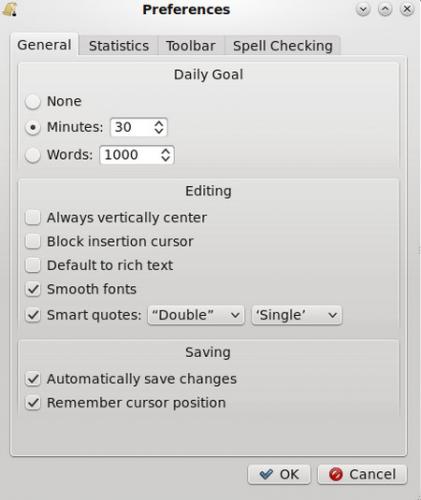
- มีระบบบอกแจ้งสถิติการพิมพ์เอกสารกันแบบสดๆ ไม่ว่าจะเป็น จำนวนตัวอักษรที่พิมพ์ไปแล้ว (Character Count) คำที่พิมพ์ไปแล้ว (Word Count) ย่อหน้าที่พิมพ์ไปแล้ว (Paragraph Count) หรือ จำนวนหน้าที่พิมพ์ไปแล้ว (Page Count) จะได้รู้ความคืบหน้าของการพิมพ์เอกสารของเราเองด้วย ซึ่งความสามารถนี้สามารถสั่งเปิดปิดได้ตามต้องการ
- สามารถตั้งเป้าการพิมพ์เอกสารในแต่ละวันได้ (Daily Goals) เช่น ตั้งเป้าของจำนวนคำที่จะต้องพิมพ์ให้ถึง (Word Count) หรือ เวลาที่ใช้ไปในการพิมพ์เอกสาร (Time Spending) เพื่อเพิ่มและสร้างแรงบันดาลใจให้การพิมพ์เอกสาร ของคุณไปได้อย่างรวดเร็ว และมีประสิทธิภาพ มากยิ่งขึ้น
- มีระบบตรวจสอบคำผิด (Spell Checking) เพราะพวกเราทุกคนต้องเคยพิมพ์ผิด ทั้งพิมพ์ผิดแบบไม่รู้จริงๆ หรือ พิมพ์ผิดเพราะกดปุ่มบนแป้นพิมพ์ผิด โปรแกรมเอกสาร ตัวนี้มีระบบตรวจสอบคำผิด แก้ไขให้อัตโนมัติเลยทีเดียว
- มีระบบเปิดเอกสารแบบหลายๆ แท็บ (Document Tabs) เหมือนเว็บเบราว์เซอร์ ทั้งหลายในปัจจุบัน แทนการเปิดหลายหน้าต่าง จะทำให้รก Taskbar ของคุณเป็นอย่างมาก
- ถูกแปลภาษาออกมาแล้วมากกว่า 20 ภาษาจากทั่วโลก
- สามารถใช้งานภาษาไทยได้ อย่างเต็มรูปแบบ
- แจกฟรี 100% ไม่มีค่าใช้จ่ายใดๆ แอบแฝง
Note : สำหรับ โปรแกรม FocusWriter โปรแกรมนี้ ทางผู้พัฒนา โปรแกรม (Program Developer) เขาได้แจกให้ ทุกท่านได้นำไปใช้กันฟรีๆ (FREE) โดยท่าน ไม่ต้องเสียค่าใช้จ่ายใดๆ ทั้งสิ้น เลยทีเดียว
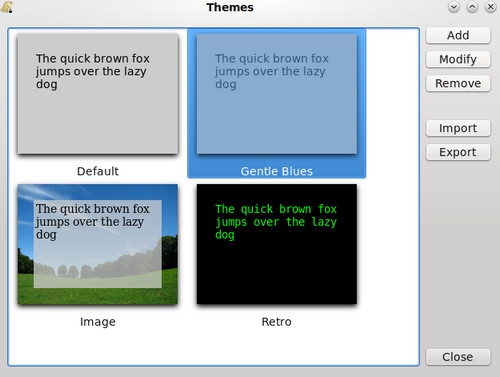
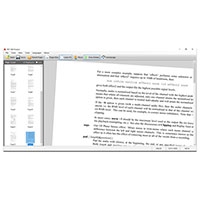
รูปภาพตัวอย่างการใช้งานของโปรแกรม FocusWriter
This program is called "FocusWriter". It is a fullscreen, distraction-free word processor designed to immerse you as much as possible in your work. The program autosaves your progress, and reloads the last files you had open to make it easy to jump back in during your next writing session, and has many other features that make it such that only one thing matters: your writing.

 คำสำคัญ

โปรแกรมที่เกี่ยวข้อง !



ความคิดเห็น ()

|
ความคิดเห็นที่ 6
7 พฤศจิกายน 2555 11:17:13
|
||
|
GUEST |

|
แบ๊ลลลลลลลล
กรอออกข้อมูลแร้ว เอาพรือ |
|
ความคิดเห็นที่ 5
7 พฤศจิกายน 2555 11:16:50
|
||
|
GUEST |
|
Sa
กาก ชิบบบ
|
|
ความคิดเห็นที่ 4
7 พฤศจิกายน 2555 11:13:28
|
||
|
GUEST |
|
ไม่สวยแต่จัยก็แอ๊บ
งงงงงงงงอยากจะรู้จังงงงง
|
|
ความคิดเห็นที่ 3
7 พฤศจิกายน 2555 11:12:39
|
||
|
GUEST |
|
ไม่บอก แบร่ๆๆ
อะไรก็ไม่รู้ งง?
|
|
ความคิดเห็นที่ 2
26 สิงหาคม 2554 14:57:01
|
||
|
GUEST |
|
Chanthaneth
Thank you very much
|
|
ความคิดเห็นที่ 1
17 มกราคม 2554 15:35:59
|
||
|
GUEST |
|
mom
ทดลองหน่อย
|

ซอฟต์แวร์ไทย
Thai Software
ซอฟต์แวร์ฟรี
Freeware
ซอฟต์แวร์สามัญ
First AID
ซอฟต์แวร์แนะนำ
Recommended
สูงสุดในสัปดาห์
Top Download
สูงสุดตลอดกาล
Hall of Fame
Submit Software
บริการเช็คความเร็วเน็ต (Speedtest) และ เช็คไอพี (Check IP)
 เช็คความเร็วเน็ต
 เช็คไอพี


Thaiware.com is owned and operated by Thaiware Communication Co., Ltd.